---
title: 06.04 Control Assessments and Evidence Collection
description: Map questionnaire questions to specific framework controls so assessment responses produce per-control evidence — and understand the load-bearing fact…
---
[Skip to content](https://support.simplerisk.com/kb/06-04-control-assessments-and-evidence-collection#main-content)
English
Show submenu for translations
[Customer portal](https://support.simplerisk.com/tickets?hsLang=en)
[](https://www.simplerisk.com/)
Open main navigation
Close main navigation
- English
Show submenu for translations
- [Customer portal](https://support.simplerisk.com/tickets)
- [Contact us](https://www.simplerisk.com/about-us/contact-us)
[Contact us](https://www.simplerisk.com/about-us/contact-us)
How can we help you?
- There are no suggestions because the search field is empty.
1. [SimpleRisk Knowledge Base](https://support.simplerisk.com/kb?hsLang=en)
2. [User Guide](https://support.simplerisk.com/kb/user-guide?hsLang=en)
3. [06 Assessments](https://support.simplerisk.com/kb/user-guide?hsLang=en#06-assessments)
# 06.04 Control Assessments and Evidence Collection
## Map questionnaire questions to specific framework controls so assessment responses produce per-control evidence — and understand the load-bearing fact that the Assessments Extra does NOT auto-create entries in the compliance module's control test audit table.
> **Requires:** *Assessments Extra*
>
> The question-to-control mapping, per-question file uploads, and pending-risk workflow described in this article live in the Assessments Extra. The compliance module's framework-control-test audit workflow (documented in [Control Tests and Evidence Collection](https://support.simplerisk.com/kb/02-07-control-tests-and-evidence-collection?hsLang=en)) is a separate surface that doesn't share this Extra's data.
## Why this matters
A control assessment via the Assessments Extra is the program's way to ask questions whose answers say something about how a specific control is operating. The questionnaire surface gives you something the compliance module's control test workflow doesn't: a way to *capture the operator's narrative answers* in addition to the binary Pass/Fail/Inconclusive verdict the test cycle produces. A control test answers "did the control pass?"; an assessment answers "describe how the control is working, attach the evidence you used to verify, and flag anything that should become a risk."
The other reason this matters: the Assessments Extra's **per-question control mapping** lets a single questionnaire produce evidence for many controls at once. A vendor security assessment with 40 questions, each mapped to one or more of your ISO 27001 controls, generates a vendor's perspective on each mapped control with one questionnaire send. The mapping does the bookkeeping; the questionnaire shape stays manageable for the recipient.
The third thing, and this is the load-bearing fact for this article, is that the Assessments Extra does **NOT** automatically create control-test audits in the compliance module. Question responses mapped to controls produce evidence inside the *Extra* — the responses, their attached files, and the question-to-control mapping; the compliance module's test cycle continues to operate on its own data. If you want the assessment evidence to also appear in the compliance posture dashboards, you do that work explicitly (manual control-test-audit creation that references the assessment, or a custom integration script). The two surfaces are independent by design.
The fourth thing: the Extra's control assessment is **question-centric**, not control-centric. You can't create a questionnaire that targets a single control directly; instead, you map individual questions to controls, send the questionnaire, and let the response be the evidence per mapped control. Programs expecting a "create an assessment for control AC-2" workflow find the question-mapping pattern unfamiliar at first; once they understand it, the question-mapping approach is more flexible (one question can produce evidence for many controls; one control can be assessed by many questions across many questionnaires).
## Before you start
Have these in hand before building a control assessment:
- **The Assessments Extra activated** (see [Third-Party and Vendor Risk Assessments](https://support.simplerisk.com/kb/06-03-third-party-and-vendor-risk-assessments?hsLang=en) for activation specifics) and your framework(s) installed (see [Installing a Framework](https://support.simplerisk.com/kb/02-03-installing-a-framework?hsLang=en)).
- **The relevant permissions**: **Allow Access to "Assessments" Menu** for base access, **Able to Edit Questionnaire Templates** to map controls to questions (the mapping happens during template editing). Send and approve permissions per the standard assessment workflow. (See [Permission Reference](https://support.simplerisk.com/kb/03-03-permission-reference?hsLang=en).)
- **A clear list of the controls you want to assess.** "Assess our SOC 2 controls" is too broad; "assess the access-control category (AC-1 through AC-12) for the production environment" is operational. Pick a focused set; you can run multiple assessments against different control sets if the scope is large.
- **Question text that's specific enough to answer.** A question like "Are access controls in place?" is unanswerable; the responses will all be "yes." A question like "How frequently are admin access reviews performed against the production database, and who performs them?" produces specific answers you can evaluate. Spend time on the question wording; the responses you get back are only as good as the questions you sent.
- **A decision on whether responses should produce pending risks.** A questionnaire that lets respondents flag findings as pending risks generates a follow-up workflow on your side; one that doesn't keeps the assessment scope smaller. Pick deliberately based on what you expect to do with the results.
## Step-by-step
### 1. Build (or open) the questionnaire template
Sidebar: **Assessments → Questionnaire Templates** opens the template manager. Either click **Add** to create a new template or open an existing template to edit. The template is the reusable shape; multiple questionnaires can be built from the same template against different recipients on different cadences.
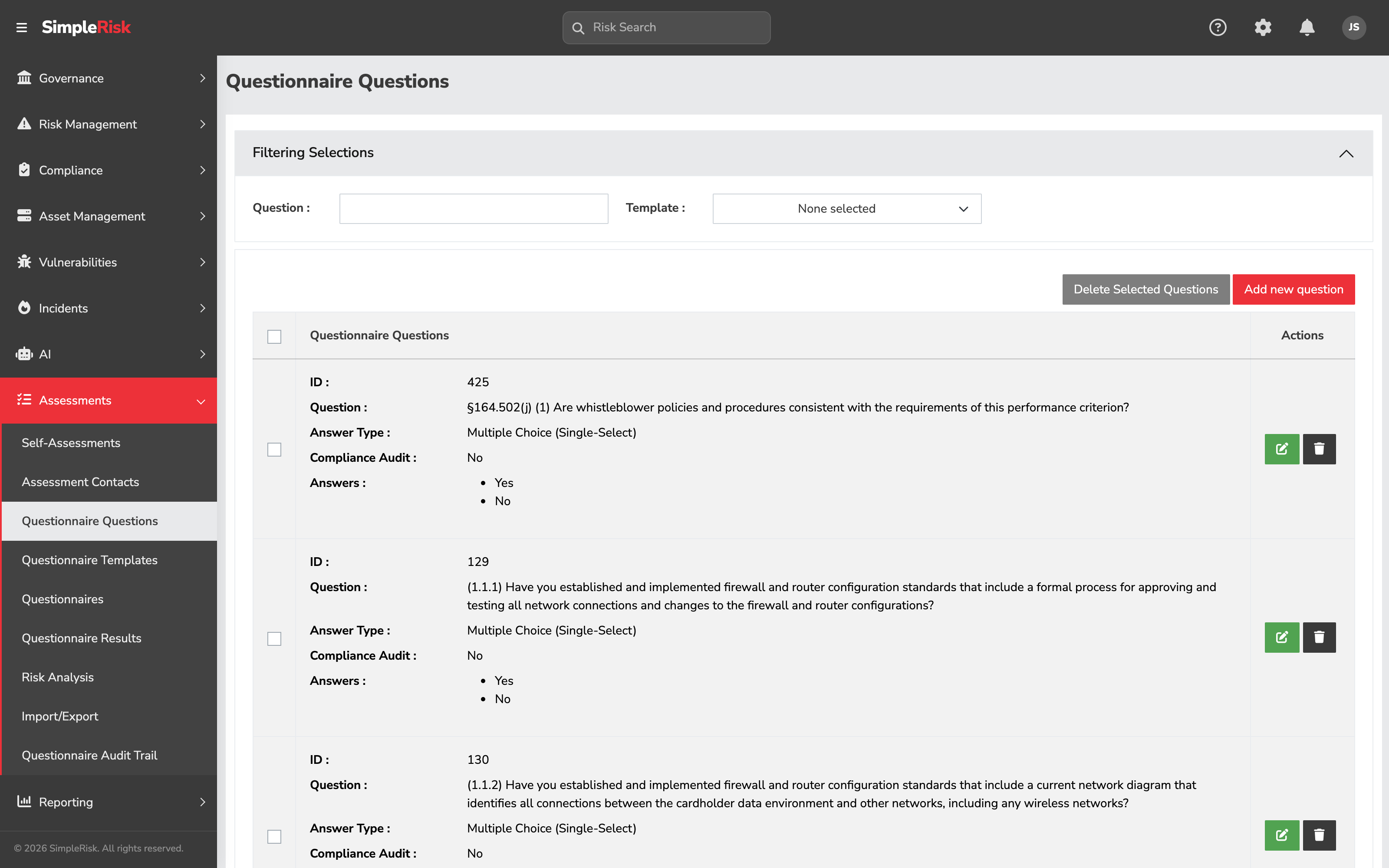
Inside the template, the **Questionnaire Questions** sub-section is where the per-question editing happens. Click a question to open its edit form; click **Add Question** to add a new one. The fields:
- **Question** — the question text itself, authored in a rich-text editor. Required.
- **Answer type** — one of exactly three: **Multiple Choice (Single-Select)**, **Multiple Choice (Multi-Select)**, or **Fill in the Blank**. Pick the type that matches how you'll use the answer. The two multiple-choice types aggregate into scores and reports; fill-in-the-blank doesn't, so reserve it for context you'll read rather than count.
- **Answer** rows (for the multiple-choice types) — the options the respondent sees, one per row. Each row can branch to a **Sub Template** or **Sub Questions**, and can carry its own risk-submission block when Risk Assessment is switched on for the question.
- **File Attachment** — checkbox (shown as the **Has File** column in the Questionnaire Questions list) controlling whether the response form shows a file-upload widget for this question. Enable for questions where the program wants documented evidence (e.g., "Provide your most recent SOC 2 report" with a file upload, vs. "What's your patching cadence?" without).
- **Required** — checkbox, on by default. The respondent can't submit without answering.
- **Question Logic**, **Risk Assessment**, **Compliance Assessment**, **Maturity Assessment** — four per-question toggles that decide what the question does with its answers. The reference table below covers each.
### 2. Map the question to one or more framework controls
This is the step that turns a generic questionnaire into a control-assessment instrument. In the question editor, find the **Mapped Controls** section (or equivalent — the labeling varies slightly with theme). Pick the framework control(s) the question's answer should produce evidence for.
The mapping is many-to-many at the question level:
- A single question can map to multiple controls. "Describe your access-review process" can map to ISO 27001 A.5.15 (Access control), NIST 800-53 AC-2 (Account management), and SOC 2 CC6.1 (Logical and physical access controls) all at once. The single answer produces evidence for all three mapped controls.
- A single control can have multiple questions mapped to it across templates. The control AC-2 might be assessed by question #14 in the vendor template, question #7 in the internal-controls template, and question #22 in the cloud-security template; each questionnaire send produces additional evidence for the same control.
A question can map to a control once, and the mapping is otherwise unconstrained. The relationship is loose — the mapping says "the answer to this question is relevant to this control"; it doesn't enforce that the answer satisfies the control.
The **v2 API** equivalent is `POST /api/v2/assessments/questionnaire/template/controls`, which adds or updates the mappings programmatically — useful for scripted bulk mapping when you have hundreds of questions to wire up.
### 3. Build and send the questionnaire
The questionnaire-assembly step is identical to the standard self-assessment and vendor-assessment workflows; see [Running a Self-Assessment](https://support.simplerisk.com/kb/06-02-running-a-self-assessment?hsLang=en) for the full mechanics. The control-assessment-specific notes:
- **Pick recipients who can speak to the controls.** A questionnaire mapped to access-control questions should go to the people running access provisioning (typically IT operations, sometimes security engineering). Sending it to the wrong recipient produces responses that don't reflect the control's reality.
- **Include the framework context in the User Instructions.** "This questionnaire produces evidence for our ISO 27001 controls in section A.5" tells the recipient why their answers matter and what posture they're affecting. Without that framing, the recipient answers without context.
- **Set the cadence to match the control review cadence.** If the relevant controls are reviewed quarterly per the compliance module's test schedule, set the assessment to run quarterly too. The two cadences should reinforce each other.
### 4. Collect evidence files via per-question uploads
For questions where you want documented evidence (a screenshot, an export, a signed attestation), the **File Attachment** checkbox on the question definition enables a file-upload widget on the response form. The recipient attaches the file when answering; the file is stored against that specific answer, so it stays tied to the question and the response it came from.
Convention notes:
- **Specify the expected evidence in the question text.** "Provide your most recent vulnerability scan report (PDF or screenshot of the scanner dashboard)" tells the recipient what's expected. A file-upload widget without context produces nothing or produces irrelevant files.
- **Don't require evidence on every question.** Evidence-heavy questionnaires are slow to fill out and many of the files end up being marginal. Reserve **File Attachment** for the questions where the response *needs* documentation to be meaningful.
- **The file is tied to the response, not to the control.** A file uploaded against a question that's mapped to control AC-2 is recoverable as evidence for AC-2 (via the question-control mapping plus the file's tracking ID), but the compliance module's control-test view doesn't auto-show the file. You read the assessment results and the compliance dashboard separately.
The **v2 API** for evidence file management is `POST /api/v2/assessments/questionnaire/result/file` (attach) and `DELETE /api/v2/assessments/questionnaire/result/file` (remove).
### 5. Use the Risk Analysis sub-menu for aggregate views
Sidebar: **Assessments → Risk Analysis** opens `/assessments/questionnaire_risk_analysis.php`. The page provides aggregate stats per questionnaire across three categories:
- **All Risks** — total risks identified through the questionnaire's responses.
- **Added Risks** — newly-identified risks from the most recent send.
- **Closed Risks** — risks identified previously and now closed.
Each row shows count, cumulative score, and average score. Useful for "show me overall posture from this control assessment" reporting, especially across multiple sends of the same questionnaire over time. The page is a *summary* surface; the per-response detail still lives in **Questionnaire Results**.
### 6. Review responses and walk the pending risks
For control-assessment responses, the review step is twofold:
1. **Read the response for each mapped control.** Open the response on the **Questionnaire Results** page. The mapping isn't surfaced as "AC-2 evidence" directly — you read the question, see the response, and recall (or look up via the question editor) which controls it was mapped to. For programs running structured control assessments, building an external mapping reference (a spreadsheet listing each question and its controls) helps the reviewer keep track.
2. **Walk the Pending Risks queue.** If respondents flagged any answers as pending risks, those wait in the Pending Risks queue for review. Each pending risk has a subject, owner, asset, and comment populated from the questionnaire response context; the reviewer either approves it (it becomes a formal risk in the standard register) or rejects it. The full pending-risk workflow is documented in [Running a Self-Assessment](https://support.simplerisk.com/kb/06-02-running-a-self-assessment?hsLang=en).
### 7. Cross-link to the compliance module manually (if needed)
Because the Extra doesn't auto-create control-test audits, the path to surface assessment-derived evidence in the compliance module's test cycle is manual. Two patterns work:
- **Reference the assessment in a manual control test audit.** When you next perform a manual control test on a control assessed via questionnaire, reference the questionnaire response in the test's **Summary** field ("Tested via Q3 2026 vendor assessment, response approved by \[reviewer\], evidence file attached to question X"). The evidence chain is reconstructable but lives in two places.
- **Custom script the conversion.** For programs that genuinely need bidirectional integration, a custom script can read approved responses from the Extra and POST corresponding control test audits via the compliance module's API. This is custom work, not a built-in feature.
For most programs, the reference-in-the-summary pattern is enough. The two surfaces stay independent; the audit conversation reads both.
## Reference: question types and per-question options
The question editor (**Assessments → Questionnaire Templates →** open a template **→ Add Question**) isn't a fixed form — what it shows you depends on the type and toggles you pick. So it's documented here as a controlled vocabulary rather than a field list.
**Answer types** — pick exactly one per question:
- ****Multiple Choice (Single-Select)**:** The respondent picks exactly one answer. Aggregates cleanly for scoring and reporting.
- ****Multiple Choice (Multi-Select)**:** The respondent picks one or more answers.
- ****Fill in the Blank**:** A free-text response. Flexible, but it won't aggregate — reserve it for supplementary context.
**Per-question options** — the checkboxes that decide what the question does with its answers:
- ****Required**:** The respondent must answer before submitting. On by default.
- ****File Attachment**:** Shows a file-upload widget on the response form, for documented evidence.
- ****Question Logic**:** Branches to sub-questions or a sub-template based on the answer chosen.
- ****Risk Assessment**:** Enables the per-answer risk-submission block, so a chosen answer can generate a pending risk. On by default.
- ****Compliance Assessment**:** Tracks a pass/fail verdict against the question's mapped controls.
- ****Maturity Assessment**:** Tracks a control-maturity value against the mapped controls.
**Per-answer fields** (multiple-choice types only): each answer row carries its **Answer** text, which is required, and — depending on which toggles are on — a **Sub Template** or **Sub Questions** branch, a **Submit Risk** block, a **Fail Control** flag, and a **Control Maturity** value.
## Common pitfalls
A handful of patterns recur with control assessments via the Extra.
- **Expecting the compliance dashboard to update.** The single biggest surprise. A program activates the Extra, maps questions to controls, sends the questionnaire, gets responses, and then opens the compliance dashboard expecting the controls to show as "tested." They don't. The compliance dashboard reads control-test audits, which the Extra never writes. The assessment evidence is real, but it's in the Extra's tables; treat it as a parallel artifact, not as a feed into the compliance module.
- **Mapping questions to too many controls.** A "describe your security program" question mapped to fifty controls dilutes the per-control signal — the response says something about each of fifty controls, but probably not anything specific. Map questions to the controls they genuinely speak to (one to five is typical); resist the temptation to over-map for breadth.
- **Mapping questions to no controls.** A question with no control mapping isn't part of the control-assessment workflow at all; it's a generic questionnaire question. That's fine for some questions (general context, demographic information) but a control-assessment questionnaire that doesn't actually map to controls isn't a control assessment, just an assessment.
- **Using free-text everywhere.** Free-text answers are unsearchable, unaggregatable, and produce a per-question reading exercise the reviewer can't sustain at scale. Use multiple-choice or yes/no for the *control-relevant* answers; reserve free text for the supplementary context. The compliance posture you derive from the responses depends on being able to evaluate the answers consistently.
- **Treating pending risks as the only output.** A control assessment can produce useful evidence even when it flags zero pending risks. The response itself is the evidence — the absence of flagged risks doesn't mean the assessment didn't produce anything, it means the responses didn't surface findings worth elevating. Read the responses for posture even when they don't generate pending risks.
- **Skipping the File Attachment option on evidence-relevant questions.** A question that asks "describe your encryption practices" without a file-upload widget gets a paragraph; the same question with **File Attachment** enabled gets the encryption configuration export the program can verify. Use the file upload for the questions where documented evidence makes the response auditable.
- **Reusing one questionnaire for multiple compliance frameworks.** A single questionnaire mapped to ISO 27001, SOC 2, NIST CSF, and PCI controls produces a response that's evidence for all four — but the questionnaire is also long, the recipient's response quality drops, and the framework-specific audit conversations want framework-specific framing. Better: maintain framework-specific questionnaire templates; share underlying questions where the wording works for multiple frameworks.
- **Not coordinating with the compliance module's test cycle.** A control assessed via questionnaire in Q3 and tested via compliance module's standard test in the same Q3 produces two evidence streams covering the same period. That's not bad (duplicate evidence is generally good) but if the two streams disagree (questionnaire response says "operating well," compliance test fails), the reviewer needs to investigate. Coordinate the cadences so the streams produce comparable evidence.
- **Letting the Risk Analysis sub-menu sit unread.** The aggregate view is the only place where multi-cycle questionnaire trends show up. Programs that focus only on the per-response detail miss the longitudinal patterns the Risk Analysis page surfaces. Schedule a monthly look at Risk Analysis as part of the program review cadence.
## Related
- [What is a GRC Assessment?](https://support.simplerisk.com/kb/06-01-what-is-a-grc-assessment?hsLang=en)
- [Running a Self-Assessment](https://support.simplerisk.com/kb/06-02-running-a-self-assessment?hsLang=en)
- [Third-Party and Vendor Risk Assessments](https://support.simplerisk.com/kb/06-03-third-party-and-vendor-risk-assessments?hsLang=en)
- [Control Tests and Evidence Collection](https://support.simplerisk.com/kb/02-07-control-tests-and-evidence-collection?hsLang=en) (the compliance-module test cycle the Extra does NOT integrate with automatically)
- [Control Frameworks and Control Families](https://support.simplerisk.com/kb/02-02-control-frameworks-and-control-families?hsLang=en)
- [Permission Reference](https://support.simplerisk.com/kb/03-03-permission-reference?hsLang=en)
- [FAQs](https://support.simplerisk.com/kb/faqs?hsLang=en)
- [SimpleRisk Extras](https://support.simplerisk.com/kb/simplerisk-extras?hsLang=en#main-content)
- [Vulnerability Management Extra](https://support.simplerisk.com/kb/simplerisk-extras?hsLang=en#vulnerability-management-extra)
- [Team Separation Extra](https://support.simplerisk.com/kb/simplerisk-extras?hsLang=en#team-separation-extra)
- [Import-Export Extra](https://support.simplerisk.com/kb/simplerisk-extras?hsLang=en#import-export-extra)
- [Administrator Guide](https://support.simplerisk.com/kb/administrator-guide?hsLang=en#main-content)
- [00 About This Guide](https://support.simplerisk.com/kb/administrator-guide?hsLang=en#00-about-this-guide)
- [01 Installation and Deployment](https://support.simplerisk.com/kb/administrator-guide?hsLang=en#01-installation-and-deployment)
- [02 Upgrades and Maintenance](https://support.simplerisk.com/kb/administrator-guide?hsLang=en#02-upgrades-and-maintenance)
- [03 Users and Permissions](https://support.simplerisk.com/kb/administrator-guide?hsLang=en#03-users-and-permissions)
- [04 Authentication](https://support.simplerisk.com/kb/administrator-guide?hsLang=en#04-authentication)
- [05 Customization](https://support.simplerisk.com/kb/administrator-guide?hsLang=en#05-customization)
- [06 Configuring Risk and Compliance](https://support.simplerisk.com/kb/administrator-guide?hsLang=en#06-configuring-risk-and-compliance)
- [07 Integrations](https://support.simplerisk.com/kb/administrator-guide?hsLang=en#07-integrations)
- [08 The API](https://support.simplerisk.com/kb/administrator-guide?hsLang=en#08-the-api)
- [09 Encryption and Data Security](https://support.simplerisk.com/kb/administrator-guide?hsLang=en#09-encryption-and-data-security)
- [10 Workflows and Automation](https://support.simplerisk.com/kb/administrator-guide?hsLang=en#10-workflows-and-automation)
- [11 Reporting and Auditing](https://support.simplerisk.com/kb/administrator-guide?hsLang=en#11-reporting-and-auditing)
- [12 Operations](https://support.simplerisk.com/kb/administrator-guide?hsLang=en#12-operations)
- [13 Reference](https://support.simplerisk.com/kb/administrator-guide?hsLang=en#13-reference)
- [User Guide](https://support.simplerisk.com/kb/user-guide?hsLang=en#main-content)
- [00 Foundations of GRC](https://support.simplerisk.com/kb/user-guide?hsLang=en#00-foundations-of-grc)
- [01 Risk Management](https://support.simplerisk.com/kb/user-guide?hsLang=en#01-risk-management)
- [02 Compliance Management](https://support.simplerisk.com/kb/user-guide?hsLang=en#02-compliance-management)
- [03 Governance](https://support.simplerisk.com/kb/user-guide?hsLang=en#03-governance)
- [04 Asset and Data Inventory](https://support.simplerisk.com/kb/user-guide?hsLang=en#04-asset-and-data-inventory)
- [05 Threat and Vulnerability Management](https://support.simplerisk.com/kb/user-guide?hsLang=en#05-threat-and-vulnerability-management)
- [06 Assessments](https://support.simplerisk.com/kb/user-guide?hsLang=en#06-assessments)
- [07 Incident Management](https://support.simplerisk.com/kb/user-guide?hsLang=en#07-incident-management)
- [08 Audit and Reporting](https://support.simplerisk.com/kb/user-guide?hsLang=en#08-audit-and-reporting)
- [09 Day-to-Day SimpleRisk](https://support.simplerisk.com/kb/user-guide?hsLang=en#09-day-to-day-simplerisk)
- [10 Continuous Improvement](https://support.simplerisk.com/kb/user-guide?hsLang=en#10-continuous-improvement)
- [SimpleRisk User Guides](https://support.simplerisk.com/kb/simplerisk-user-guides?hsLang=en)
- [Troubleshooting](https://support.simplerisk.com/kb/troubleshooting?hsLang=en)
- [SimpleRisk Hosted](https://support.simplerisk.com/kb/simplerisk-hosted?hsLang=en)
- [How To videos](https://support.simplerisk.com/kb/how-to-videos?hsLang=en)
[](https://www.simplerisk.com)
Copyright © 2026, SimpleRisk, Inc.