
Why this matters
Tests are how a compliance program verifies that the controls it claims to operate are actually operating. A control with no test attached is a control the program intends to operate; a control with a test attached and a recent passing result is a control the program has evidence of operating. The difference matters: an auditor reading the documentation reads it against the operations, and the evidence trail is what bridges the two.
Most working compliance programs run dozens to hundreds of tests on a rolling cadence — quarterly for most controls, monthly for high-criticality ones, annually for low-impact ones. The mechanics of "which tests are due this week, who owns each, what evidence does each need" is the daily work of compliance, and it scales worst when done by hand. SimpleRisk's test-and-evidence module is built to handle the bookkeeping at scale; the practitioner work is defining the tests once and then executing them on schedule.
The other thing worth knowing: tests link bidirectionally to risks. A failed control test surfaces a risk (the control isn't operating, the risk it was supposed to mitigate is now exposed); a successful retest can close the surfaced risk. SimpleRisk's data model captures the link via the test_result_to_risk table, which means the risk register and the compliance posture stay in sync as controls degrade and recover. The integration is what makes "compliance affects risk and risk affects compliance" tractable in operations rather than just in theory.
Before you start
Have these in hand before you open the test workflow:
- The right permissions for the part of the workflow you're doing. Defining tests requires Able to Define Tests. Initiating audits (manually scheduling a test execution) requires Able to Initiate Audits. Submitting a test result and attaching evidence requires Able to Modify Audits. Retiring or restoring a test requires Able to Edit Tests or Able to Delete Tests (either one); deleting a test permanently requires Able to Delete Tests. The permissions are separate so that a program can split test definition (second-line work) from test execution (first-line work). (See Permission Reference.)
- Controls to test against. Controls are normally created through an installed framework (see Installing a Framework), but SimpleRisk also supports frameworkless controls — controls that exist in the system without being mapped to any framework. Frameworkless controls appear in the Define Tests grid alongside framework-assigned ones (they just show no 🔗 framework badge on their header row); on the Initiate Audits treegrid they appear under the Unassigned node. Either way, you can define and run tests on them the same way you would for framework-assigned controls.
- A clear sense of what passing looks like for the control under test. A test definition without a documented expected result produces audits where the tester has to invent the bar each time, which produces inconsistent results across audits. Spend time on the Expected Results field; the consistency it produces is what makes test-result trends meaningful.
- For tests with attached evidence: a clear sense of what evidence is required and what isn't. A test that attaches every available document to every audit produces an evidence repository nobody can navigate; a test that attaches no evidence produces audit results that can't be defended. The right answer is "the specific artifacts that prove this test passed" — usually a small number per audit, named for the audit they support.
Step-by-step
1. Define the test against the control
Tests are defined under the Compliance module's Define Tests tab. Sidebar: Compliance → Define Tests opens the page.
Across the top of the page sits a band of six tiles reading the program at a glance: Total Tests, Passing, Failing, Due Soon, Overdue, and Untested Controls. Each tile is a link. Click Overdue and the grid below filters to the overdue tests; click Untested Controls and it switches to the controls with no test defined. The tiles count active tests only, so a retired test never inflates the numbers the program reports on.
The page groups tests under the control they test. Each control gets a header row (control number, short name, a 🔗 badge showing how many frameworks map to it, the control's long name and owner, and a test count), with its tests listed underneath. Click a control's header to expand it and see the control's description alongside its Framework / Control / Reference mapping table, one row per framework the control is mapped to — the cross-framework view, on demand, without leaving the test list. A control with no tests still gets a header row: a quiet "no tests yet for this control" line takes the place of test rows, so an in-scope control never just disappears from the list for lack of a test.
Every control header row carries two buttons. + Add Test opens the definition form with that control pre-selected. Apply common tests… opens a searchable, multi-select picker of the tests already defined elsewhere in the program, so a test that validates the same thing across a dozen controls gets attached to each of them without being re-typed a dozen times. A test shared by more than one control shows a 🔗 Common badge with the number of controls using it, on the row and again in its expanded procedure — worth noticing before you edit one, because the edit lands everywhere the test is used.
Each test row shows its tester, a Schedule chip (a plain-language summary of the test's Manual/Interval/Calendar cadence: "Every 3 Months," "Manual," and so on), a Last Result pill (Pass, Fail, Inconclusive, or Not Tested if the test has never been audited), and a Next Due pill. Next Due speaks in time rather than in severity: Overdue · 36 days, Due in 5 days, Due today, Due tomorrow, Scheduled · {date} for a test that's on track, or Manual for a test with no automatic schedule. Hover it for the literal due date. Overdue rows also carry a red stripe down their left edge, so a late test is findable while scrolling without reading a single pill. Click a test's name to expand it and see its read-only procedure (Objective, Test Steps, Expected Results, Tester, Approximate Time, and Tags) without opening the edit form.
The toolbar above the grid holds the page title, a {n} Tests count, an Overdue count when any are late, a live search box, and the primary Add Test button, which opens the definition form with the control picker blank so you can pick any control from the roster. Search matches as you type against the test name, the control's number and name, and every framework mapped to the control (its reference ID and reference text) — so you can find a test by whichever framework you think in, not just by SimpleRisk's own control numbering.
Below the toolbar, a row of nine filters narrows the list, ordered from the controls in scope to the tests themselves:
- All frameworks: Controls mapped to the frameworks you pick (multi-select)
- All families: Controls in the families you pick (multi-select)
- Controls with tests: The default. Also All controls, or Untested controls for the coverage gaps
- All statuses: Overdue, Due soon, or On track
- All results: Passing, Failing, Inconclusive, or Not tested
- All testers: Tests assigned to one person
- Any schedule: Calendar, Interval, or Manual tests
- Any tag: Tests carrying one tag
- Active tests: The default. Also All tests, Retired only, or — only when the AI control-test capability is enabled — AI suggested
Each option carries a count, and an option matching nothing is greyed out — so the filter row doubles as a read of the program before you click anything. The counts are program-wide totals for that filter, not counts within your current selection.
Filters combine, and the combination lives in the page's address. Narrow to a tester's overdue tests and the URL carries that view, including which page of results you're on; send the link to that tester and they open exactly what you were looking at. This is the fastest way to hand someone their own queue.
On a narrower window the grid tightens rather than scrolling sideways. Test ID and Tester step aside first; then Last Tested folds into Last Result, which reads as the result over its date; then the row actions collapse into a ⋯ menu, and Schedule moves into the expanded procedure panel, where it was always shown in full. Narrower still, each test stops being a row and becomes a small block — its name, then when it's next due, then how it last went — with the control it belongs to still heading the group above it. The filter row folds behind a Filters button carrying the number of filters currently applied, so a narrowed grid never looks like the whole program with rows missing. Whatever the width, a row always tells you what the test is and whether it needs you today without scrolling across.
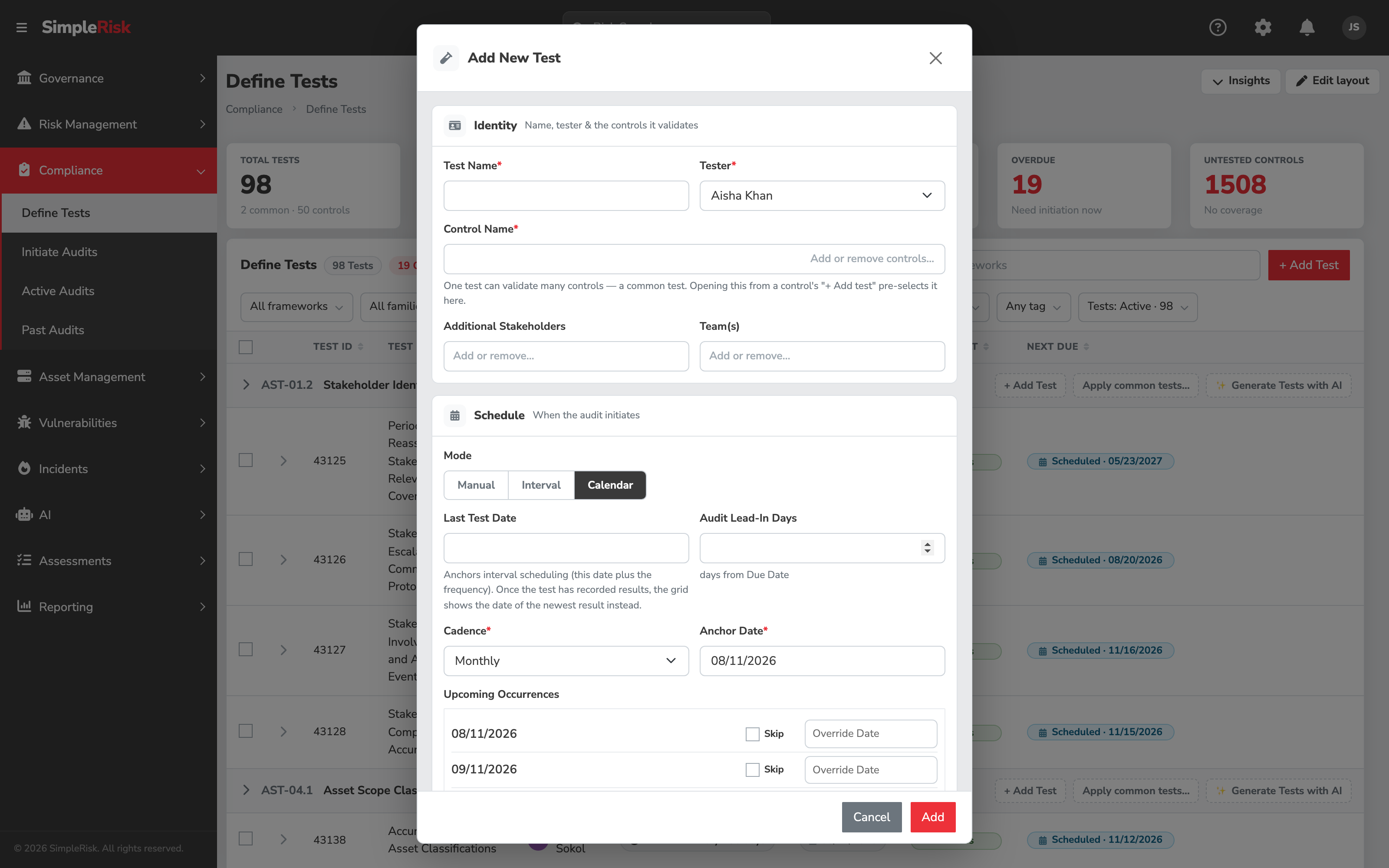
Click Add Test to open the test definition form and fill in the fields:
- Test Name — a short descriptive name. "Quarterly access review for the production database" beats "Test 17."
- Control Name — the control, or controls, this test validates. The field shows the current selection as chips (each chip carries the control's number; hover it for the full name) alongside an Add or remove controls… button that opens the Choose controls dialog. It is a multi-select: one test validating several controls is exactly what makes it a common test. Opening the form from a control's own + Add Test button pre-selects that control; opening it from the toolbar's Add Test leaves the field empty and open to any control in the system, framework-assigned or frameworkless. See Choosing controls below for how the dialog narrows a large roster.
- Tester — single-user picker. The default tester for audits generated from this test definition. Editable per audit.
- Additional Stakeholders — multi-user picker. People notified about audits but not responsible for executing them.
- Teams — multi-team picker. Teams whose work the test covers.
- Schedule — three modes govern how, and whether, SimpleRisk creates the next audit automatically. Manual means no automatic initiation at all; someone starts the audit by hand; unlike Calendar, which requires its Anchor Date to be today or later, Manual and Interval both accept a past Last Test Date, making them the paths for recording audits that already happened. Interval is the classic countdown-from-last-close model: the next due date is Last Test Date plus Test Frequency. Calendar recurs on a fixed cadence anchored to a date, independent of when the previous audit actually closed — a Quarterly test anchored to January 1 lands on January 1, April 1, July 1, and October 1 every year, whether or not Q1's audit closed on time. Calendar is the default for new test definitions. Existing tests keep whatever schedule they had before this release: Interval if they'd already set an offset, Manual otherwise. Nothing about an existing test's behavior changes on upgrade.
- Test Frequency — number of days between scheduled tests, used only when Schedule is Interval. Common values: 30 (monthly) for high-criticality controls, 90 (quarterly) for most, 180 or 365 for low-impact.
- Last Test Date — the date of the most recent execution. Interval mode anchors the next due date to this value; Calendar mode ignores it and anchors to Anchor Date instead. Note that this field and the grid's Last Tested column can differ: the column reports the date on the test's newest recorded result, and falls back to this field only when the test has never been run. Editing this date re-anchors the schedule; it does not rewrite the history the column reads from.
- Audit Lead-In Days — number of days before the due date to create the audit, so the tester has lead time. Default 0; a non-zero value gives advance notice. Applies to Interval and Calendar; Manual audits are started by hand, so there's no lead-in to configure.
- Next Test Date — shown for Manual and Interval schedules. Auto-calculated from Last Test Date + Test Frequency, but editable if you want a specific date for the next audit. Calendar schedules compute the next due date from Cadence and Anchor Date instead, so this field doesn't appear.
- Cadence — Calendar schedules only. Pick a preset — Daily, Weekly, Biweekly, Monthly, Quarterly, Semi-Annually, or Annually — or choose Custom to set your own interval and unit (every 6 weeks, every 2 months, whatever the control's actual review rhythm is).
- Anchor Date — Calendar schedules only. The date the cadence counts from. It has to be today or later — SimpleRisk checks as you type and again on save, and rejects a past date with "Anchor date must be today or later. To schedule a past date, create a Manual test instead." A Calendar schedule can't represent a backdated cadence; Manual is the right tool when the audits you're recording already happened.
- Upcoming Occurrences — Calendar schedules only. A live preview of the next several due dates computed from Cadence and Anchor Date. Each row has a Skip checkbox (drop that one occurrence from the schedule — no audit gets created for it) and an Override Date field (move that one occurrence to a different date without touching the underlying cadence). An occurrence whose natural date has already passed shows an Overdue badge in the preview. Skips and overrides apply to a single occurrence only; every other occurrence keeps following the cadence.
- Objective — what the test is trying to verify. Free text.
- Test Steps — the procedure for performing the test. Free text. Be specific enough that someone other than the test author can execute it.
- Approximate Time — minutes per execution. Used in capacity planning reports; doesn't gate execution.
- Expected Results — what a passing test looks like. Free text. The most important field for consistency — vague expected results produce inconsistent audit results across testers.
- Tags — free-text labels for filtering and reporting.
Click Add (the Edit Test form's equivalent is Update). SimpleRisk saves the definition and, for Interval and Calendar schedules, starts the auto-initiation cycle. Any skips or overrides you set on the Upcoming Occurrences preview are stored against that specific occurrence, so the rest of the cadence is unaffected.
Choosing controls
An installed framework brings hundreds of controls with it, and a program running several frameworks has thousands. Add or remove controls… opens the Choose controls dialog, which narrows that roster three ways at once:
- Framework and Control Family panes on the left. Picking a framework narrows the family list to the families that framework actually uses, and narrows the control list to both. Each option carries a count of what sits behind it; an option with nothing behind it stays visible but greyed, so the panes answer "is there anything here?" without you clicking to find out. Each pane has its own Clear — and All frameworks / All families do the same thing from the top of the list.
- A Search by number or name box that matches the control's number and its name together, so "AC-2" and "account management" both find the same control. Search runs inside whatever the facets have already narrowed to.
- A Selected column on the right listing what you've picked so far, with a count. Each entry has its own ×, so removing one mistake doesn't cost you the rest of the selection.
Nothing reaches the form until you click Use these controls. Cancel, Esc, or closing the dialog leaves the field exactly as it was — including a selection you spent time assembling in the dialog and then thought better of. Reopening the dialog shows the controls already on the field as selected, so adding a fourth control to a test that has three doesn't mean re-picking the first three.
The dialog is keyboard-workable throughout: type to search, up and down arrows to move through the control list, Enter to select or deselect the highlighted control, Esc to cancel. The hint at the bottom of the dialog says the same.
The Edit Test form's Control Name field is the same picker, pre-loaded with the test's current controls — which makes it the place where a test grows into a common test, or stops being one. Removing a control here unlinks the test from that control without deleting the test. Every test has to keep at least one control: save with the field empty and the form refuses with "At least one control is required" rather than saving a test attached to nothing.
Generating tests with AI
If your program runs the AI Extra with the Control Test Generation capability turned on, the Define Tests grid grows a few extra affordances for drafting tests. They're opt-in and off by default; when the capability is disabled, none of them appear and the grid behaves exactly as described above. An administrator enables the capability in the AI capabilities catalog — see The AI Extra Overview.
With the capability on, every control header row picks up a ✨ Generate Tests with AI button beside + Add Test and Apply common tests… (you still need the permission to define tests for it to show). Clicking it queues a background job that drafts one or more candidate tests for that control, grounded in the control's framework mapping, its current-versus-target maturity, the tests already defined elsewhere in the program (so it doesn't re-propose one you already run), any self-assessment results the control carries, and the risks and assets the control is mapped to. Nothing lands in the test list yet — the draft comes back as a proposal for you to review.
Proposals surface as their own rows under the control, each marked with a ✨ AI suggested pill so an AI draft is never mistaken for a defined test. A suggestion row offers three actions: Create accepts the draft as-is and writes it to the test list; Review & edit opens it in the test definition form, pre-filled with the drafted objective, steps, expected results, sample, and required evidence, and its suggested cadence set as an Interval schedule, so you can adjust anything before saving; Dismiss discards it. To read the suggestions on their own, switch the last filter in the row (the Active tests / All tests / Retired only one) to AI suggested; the All tests mode interleaves them with the real tests instead.
When several suggestions are waiting, check the ones you want and use Create selected in the bulk action bar to accept them in a single pass. The AI drafts; the operator decides what becomes a real test — the same suggest-and-review discipline the AI Extra follows everywhere.
2. Initiate an audit (or wait for auto-initiation)
For Interval and Calendar schedules, automatic initiation is the default rather than something you opt into. A queue job (core_audit_initiate) checks hourly for tests whose due date, minus the Audit Lead-In Days, has arrived, and creates the audit. Earlier SimpleRisk releases ran this as an hourly cron_audit script; it's now a queue job processed by the same background workers that drive the rest of SimpleRisk's async work — see The Cron Jobs for the operator side of that. The new audits appear in the Active Audits queue at /compliance/active_audits.php and the assigned tester gets a notification (if the email cron is configured).
The job also catches up. If a schedule's due date passed while nothing was running to catch it — or just because a window slipped — the job still creates the audit rather than skipping it silently; the obligation doesn't disappear because the window closed. An audit created this way shows Overdue appended to its status in the Active Audits queue, so the tester and anyone reviewing the queue can see at a glance which audits are running behind. Before creating anything, the job checks whether an audit already exists for that due date on that test, however it was created, and skips creating a duplicate — initiating an audit by hand ahead of the scheduled window doesn't produce a second one when the window arrives.
For Manual schedules, manual initiation is the only path. Open the test definition and click Initiate Audit, or use the Audit Initiation workflow at /compliance/audit_initiation.php to initiate audits in batch (multiple tests at once for the same audit period). On the Initiate Audits page, framework-assigned controls appear under their framework's node in the treegrid; frameworkless controls appear under the Unassigned node. To show the Unassigned node, select Unassigned in the Framework filter at the top of the page.
Either path creates an audit linking the test definition, the framework control, the tester, when it was created, and its initial status.
3. Perform the audit and submit the result
The tester sees the audit in the Active Audits queue. Click the audit to open /compliance/view_test.php?id={test_audit_id}, which renders the full test execution form: the test definition (Objective, Test Steps, Expected Results visible at the top), the result-submission section, and the evidence-attachment section.
Fill in the result fields:
- Test Result — dropdown with three values: Pass (control operated as designed), Fail (control did not operate as designed), Inconclusive (test could not be performed or the result was ambiguous). Required.
- Tester — pre-populated with the test definition's tester; editable if a different person actually performed the test.
- Test Date — the date the test was performed. Defaults to today.
- Teams — multi-team picker, pre-populated from the test definition.
- Summary — free-text textarea describing what was tested, what was found, and the rationale for the result. The audit-trail content for this audit lives here; spend the time on it.
- Tags — free-text labels for filtering.
4. Attach evidence
Evidence files attach via the file upload section of the form. Pick the files (screenshots of the control configuration, logs from the test execution, exported reports, signed-off documents, whatever the control's nature requires) and upload. Each file is stored against that specific audit instance, so evidence stays tied to the test run it came from rather than floating loose against the control.
Evidence conventions worth following:
- Name files for the audit they support. "AC-2-Q3-2026-access-review-export.pdf" is a name future-you will thank present-you for. "Document.pdf" is not.
- Attach the minimum sufficient evidence. Five files describing the access review beat fifty files including every related document. The audit conversation reads the files; padding makes the conversation slower.
- Date the evidence. A screenshot dated to the audit period proves the control operated during that period. An undated screenshot doesn't anchor to a time.
- Anonymize where appropriate. Customer data in evidence files becomes data subject to the same retention and access controls that govern the customer data itself. If the control can be demonstrated with redacted or sample data, prefer that.
5. Link surfaced risks
A failed test usually surfaces a risk: the control isn't operating, so the risk it was supposed to mitigate is now exposed. The submission form has a Submit Risk path inline; choose to either link the audit to an existing open risk in the register, or submit a new risk inline that gets linked to the audit through the test_result_to_risk table.
The link goes both ways: the risk record shows the audits that surfaced it; the audit record shows the risks it produced. When a subsequent audit passes (the control is now operating again), the form prompts to remove the link from the now-resolved risk, optionally closing it via the standard close workflow (requires Able to Close Risks). The result is a register where compliance failures and recoveries flow naturally into the risk register without manual reconciliation.
6. Save the audit
Click Submit. SimpleRisk writes:
- The test result, tied to the audit.
- The evidence files attached to it.
- Any risk-link rows in
test_result_to_risk. - Audit-log entries for the result submission, the evidence attachment, and any risk creation or linking.
- Updates to the test definition's Last Test Date (now today) and Next Test Date (today + Test Frequency).
The audit transitions to the closed state (depending on the install's closed_audit_status configuration) and moves out of the Active Audits queue. Past audits remain visible at /compliance/past_audits.php.
7. Verify the compliance posture refresh
After the audit save, the compliance dashboard widgets should reflect the new result. Open the compliance dashboard and confirm:
- The control's most-recent-result indicator shows the new result (Pass / Fail / Inconclusive).
- The framework's posture rolls up correctly — a failed test on a critical control should drop the framework's posture indicator visibly.
- Linked risks appear on the risk dashboard with the audit reference visible in the audit trail.
The verification catches the cases where the audit save worked but the rollup didn't — usually a sign of a misconfigured test-to-control link or a missing framework assignment.
8. Bulk and programmatic paths
For programs running large test cycles, two paths beyond the per-audit UI are available:
- Bulk audit initiation. The audit-initiation page at
/compliance/audit_initiation.phpinitiates many audits in one operation, which is useful at the start of a quarterly audit cycle. - v2 API. The endpoints
POST /api/v2/compliance/define_tests(datatable for defining tests),POST /api/v2/compliance/active_audits(datatable for the audit queue),GET /api/v2/compliance/audits/{id}(fetch a single audit),PATCH /api/v2/compliance/audits/{id}(update audit status), andDELETE /api/v2/compliance/audits/{id}(delete an audit) cover programmatic workflows. The result-submission endpoint is implemented as part of the audit-update PATCH; the field set matches the form. Useful for integrations with external test-execution tools (a vulnerability scanner that automatically posts results, a configuration-management database that signals control state, etc.). Schedule configuration —schedule_type,cadence_unit,cadence_interval,cadence_anchor_date,schedule_exceptions— is set throughPOST /api/v2/compliance/update_test, with the same today-or-later validation oncadence_anchor_dateas the UI form enforces.POST /api/v2/compliance/schedule_previewreturns the same upcoming-occurrences list the Define Tests modal shows, so an integration can confirm where a cadence lands before saving it. The Define Tests page itself is now API-first:POST /api/v2/compliance/tests_griddrives the grouped grid (taking the same framework, family, search, coverage, tester, schedule, tag, status, result, and retired-mode parameters the filter row sends),GET /api/v2/compliance/control_mappingsbacks the control-expand panel,GET /api/v2/compliance/tests/{id}/auditsreturns a test's audit history (what the History row action shows),DELETE /api/v2/compliance/tests/{id}/controls/{control_id}removes one test-to-control mapping without deleting the test (refused with a 409 if it is the test's last control), andGET /api/v2/compliance/tests/{id},PATCH /api/v2/compliance/tests/{id}, andDELETE /api/v2/compliance/tests/{id}cover single-test CRUD. The date fields on those endpoints —last_dateandnext_dateon the test endpoints,test_dateon the audit PATCH — accept either ISOYYYY-MM-DDor the instance's Default Date Format (Settings > Preferences), and storeYYYY-MM-DDeither way. A value in neither format comes back as a 400 rather than being stored as an empty date, so an integration that sends a malformed date finds out at the call rather than at the next audit.
9. Retire or delete a test
A test definition doesn't have to stay in the active list forever, and it doesn't have to be deleted to get out of the way either. Retiring a test archives it — it disappears from the default grid view but its audit history stays intact, and it can be restored later. Deleting a test removes it permanently.
On the Define Tests grid, each test row carries row actions gated by permission: a History action, open to anyone who can see the test; an edit icon; a retire (box icon) or restore (rotate icon) action, depending on the test's current state; and, for users with Able to Delete Tests, a delete icon. Retiring or restoring a single test happens immediately, with no confirmation prompt, because it's a reversible state flip rather than a destructive one. Deleting a single test opens a confirmation dialog first.
Remove from this control detaches the test from the control whose row you clicked, leaving it in place on every other control it validates. It appears only on tests that map to more than one control: a test has to belong to at least one, so on a single-control test the action isn't offered and Retire or Delete are the real choices. The confirmation says what survives — "the test stays on its 3 other controls" — because the distinction between removing a test from one control and deleting it outright is the whole point.
That distinction cuts the other way too. Delete removes the test from every control that uses it, not just the one you're looking at, so the confirmation for a shared test tells you how many controls it will disappear from. Retiring a shared test likewise retires it everywhere. When the intent is "this control shouldn't be validated by this test any more," the remove action is the one you want.
History opens the test's audit trail: every audit ever run from this definition, newest first, with the date it ran, the result, who tested it, and its approval state. Each row links to the audit itself — to the active audit form if it's still open, or to the read-only past-audit view once it's closed. It answers the question the grid can't, which is not "what did this test find last time" but "has this control been holding up." A test whose history alternates Pass and Fail every other quarter is telling you something a single current-state pill never will.
To act on several tests at once, check the boxes on the left of the rows you want (or the header checkbox to select every test on the current page). Selecting at least one row swaps the toolbar for a bulk action bar showing the selection count and Retire / Delete buttons (Reassign Tester and Set Schedule appear in the same bar but are disabled for now). Bulk retire and bulk delete both prompt for confirmation before running, and report back if any of the selected tests failed to update.
Retired tests are hidden from the grid by default, because the grid is an operational surface — what do I have to run, what's late, what's failing — and a retired test is none of those. The last filter in the row governs this: it opens on Active tests, and switching it to All tests or Retired only brings the retired ones back. They come back visibly archived: the row dims, the tester avatar greys out, the result pill drops to neutral, and the Next Due column reads — Archived instead of a date, since a retired test has no next date to be late for. Restore one from its row action and it returns to the active list.
Retiring a test also closes any audits still open against it, recording them as Inconclusive. That's deliberate: a test you've retired isn't going to be performed, and an audit that will never be performed shouldn't sit in the Active Audits queue counting against the program or generating reminder email. The audits stay in the history, so the record of what was open at the time isn't lost.
Retirement reaches further than the grid, and it's worth knowing where before you retire a batch. A control's implementation status in the Statement of Applicability is derived from its live tests and their latest results, and retired tests are excluded from that derivation entirely. Retiring an old failure therefore stops it dragging the control to Partial forever. Retiring a control's last live test drops the control to No tests defined in the statement, which is the honest answer rather than leaving a stale verdict standing — but on a framework you're certifying against, it reads to an auditor as a governance gap. Retire the test and define its replacement in the same sitting.
The Inconclusive result matters there too. In the statement, an inconclusive result on a live test counts the same way a test that has never run counts: it produced no verdict, so it blocks a control from reading Yes. A control with one passing test and one inconclusive test reads Partial.
Common pitfalls
A handful of patterns recur when teams operate the test-and-evidence workflow.
-
Evidence that doesn't reflect reality. A test result of Pass with attached evidence dated three months before the audit period doesn't prove the control operated during that period. Evidence has to be dated within the audit window for it to count. Re-run the evidence collection during the audit period rather than padding with old artifacts.
-
Tester is the same person as the control owner. A control owner who tests their own control is doing first-line and third-line work simultaneously. The whole point of a separate tester is to catch the cases where the owner wouldn't notice the control isn't operating. Set the tester to someone other than the control owner; SimpleRisk's permission model supports the split.
-
Skipping the Expected Results field. An audit form that opens with a blank or vague Expected Results section forces the tester to invent the bar each time. Different testers invent different bars, the test results drift, and trend analysis becomes meaningless. Spend time on the Expected Results when defining the test; the per-audit consistency it produces is the foundation of useful test-result reporting.
-
Interval or Calendar scheduling with no one watching the queue. Automation is the default for both, so a quarterly Calendar test creates audits whether or not anyone's actually performing them. After a couple of unanswered cycles the Active Audits queue is full of stale items — some flagged Overdue — and the program looks worse on dashboards than the operations actually warrant. If a test genuinely doesn't have someone lined up to execute it yet, set its Schedule to Manual until it does.
-
Trying to anchor a Calendar schedule in the past. SimpleRisk won't take it. The instinct is to backdate the cadence so historical occurrences show up in the record, but Calendar schedules only ever project forward from the anchor. If the goal is documenting audits that already happened, use Manual and record them directly instead of fighting the anchor-date validation.
-
Attaching too much evidence. "Attach every document related to access control" produces a 50-file evidence trail per audit that nobody navigates. The auditor wants the minimum sufficient set: "here are the three artifacts that demonstrate the control operated this period." Prune the evidence to what's actually probative.
-
Failing to link surfaced risks. A failed control test that doesn't produce a corresponding risk in the register leaves the program with a known control gap and no risk record showing it. Use the inline risk-submission path on the audit form to capture the gap; the risk register is what tracks the gap until the control comes back to passing.
-
Treating Inconclusive as a soft pass. Inconclusive means "the test couldn't determine whether the control operated." It's not a soft pass; it's a flag that the test design or execution couldn't produce a verdict. Inconclusive results need a follow-up: improve the test design, perform a retest with better tooling, or escalate to a different reviewer. Letting Inconclusive accumulate is letting unknowns accumulate.
-
Re-using the same evidence files across audits. Re-attaching the same PDF to every quarterly audit is fast, but it's also exactly the pattern auditors look for as a tell that the control isn't actually being re-evaluated each cycle. If the evidence is genuinely unchanged across audits (a policy document that hasn't been updated, for example), reference it in the Summary rather than re-attaching it; the audit trail makes the unchanged-content case clearly.
-
Letting Closed audits become wallpaper. The Past Audits view fills up over time; programs sometimes stop reading it. The historical audit trail is what answers "how has this control performed over time" — questions that drive the compliance posture trend reports. Keep an eye on past audits, especially when the same control is producing recurring Fail or Inconclusive results.
-
Deleting a test that should have been retired. A test with a Fail or Inconclusive result in its history is evidence the program worked as intended — the test caught something. Deleting the test definition is permanent and can't be undone; retiring gets the same stale test out of the default grid view without that risk, and it's just as easy to reverse if you retired the wrong one. Reach for Delete only when the test genuinely shouldn't have existed — a duplicate, a typo, a test defined against the wrong control.
Related
- What is Compliance Management?
- Control Frameworks and Control Families
- Installing a Framework
- Mapping Controls Across Frameworks
- The ComplianceForge SCF Extra
- The UCF Extra
- Control Applicability and the Statement of Applicability
- What is a Risk Register and Why Every Program Needs One
- Permission Reference
- The Cron Jobs