
Why this matters
Compliance frameworks are catalogs. Each one ships hundreds of named line items the program is supposed to operate, and the line items are organized into groups so a human can find them. Knowing the structure is what makes the framework navigable: "implement AC-2" is opaque if you don't know that AC is the access-control family in NIST SP 800-53; once you know the convention, AC-2 is a specific named control about account management.
The other thing knowing the structure does: it makes mapping across frameworks tractable. ISO 27001's A.5.15 is about access control. NIST CSF's PR.AC-1 is about access control. NIST SP 800-53's AC-2 is about account management. They're not identical, but they're related — and the relationship is what makes one piece of test work generate evidence for several frameworks at once. Understanding the family-and-control vocabulary is the prerequisite for the cross-framework mapping work that ends up being most of the payoff in a multi-framework program.
The third reason: SimpleRisk's compliance module mirrors this structure directly. A framework holds controls; each control belongs to exactly one framework. Hierarchy between controls and mappings across frameworks are layered on top of that basic shape. Knowing the abstractions means knowing what the UI is showing you and where to look when something doesn't render the way you expect.
How frameworks describe this
The major frameworks each organize their catalogs differently, but the basic shape (a few dozen functional families, each containing several controls) recurs across most of them.
- NIST SP 800-53 uses two-letter family codes: AC (Access Control), AU (Audit and Accountability), AT (Awareness and Training), CM (Configuration Management), IR (Incident Response), PE (Physical and Environmental Protection), RA (Risk Assessment), SC (System and Communications Protection), SI (System and Information Integrity), and roughly two dozen more. Each family contains numbered controls (AC-1, AC-2, AC-3...) with control enhancements as additional numbered variants (AC-2(1), AC-2(2)). The family code is the breadcrumb that tells you what kind of control you're looking at before you read the title.
- ISO/IEC 27001 Annex A uses themed clauses: A.5 Organizational controls, A.6 People controls, A.7 Physical controls, A.8 Technological controls (in the 2022 update, which consolidated the prior 14-clause structure). Each clause contains numbered controls (A.5.1, A.5.2, ...). The 2013 edition had a different organization (14 clauses including A.6 Organization of information security, A.7 Human resource security, A.9 Access control, etc.); the 2022 reorganization is what most fresh installs adopt.
- NIST Cybersecurity Framework (CSF) v2.0 uses six functions (Govern, Identify, Protect, Detect, Respond, Recover) split into categories (Govern.OC, Identify.AM, Protect.AC...) split into subcategories (PR.AC-1, PR.AC-2...). Three levels of nesting; the function is the broadest grouping, the category is the functional area, the subcategory is the specific outcome.
- SOC 2 uses a different structure entirely: the Trust Services Criteria (Security, Availability, Processing Integrity, Confidentiality, Privacy) act as the top-level grouping, with points of focus below them as the operational requirements. It's flatter than the NIST and ISO catalogs, which is partly why SOC 2 audits are more about narrative and evidence than ticking off control implementations.
For practitioner purposes, the structures are interchangeable: each framework gives you a name (the family or category code) and a definition (the control objective and implementation guidance), and the program implements the controls and evidences that they're operating. The vocabulary varies; the mechanics don't.
How SimpleRisk implements this
SimpleRisk maps the framework-and-control structure directly, and there are five moving parts worth naming:
- The framework. A name, a description, and an active/inactive status. A framework can sit inside another one — the ComplianceForge SCF Extra leans on that heavily — and it carries two fields that exist purely for the Statement of Applicability: a scope statement and a default justification for including a control.
- The control. Its framework-native number ("AC-2", "A.5.15"), a name, a description, an owner, and the family it belongs to. A control can also name a parent control, which is what makes hierarchical frameworks work.
- The cross-framework mapping. One entry per "this control is also that framework's control," optionally annotated with the other framework's own reference and wording. This is what makes cross-framework reporting possible.
- The audit. One entry per scheduled or completed test against a control, holding the result, the evidence, and who tested it. The whole test workflow runs on these.
- The applicability decision. Recorded per framework and control together, and only when it deviates from the default. A control nobody has touched is applicable and stores nothing; excluding or inheriting one records the state, a reason, a written justification, an optional provider, and who decided when. See Control Applicability and the Statement of Applicability.
The UI surfaces these abstractions on the Define Control Frameworks page in the Governance menu, at /governance/index.php. The page is a two-pane layout rather than a set of tabs:
- The framework rail, down the left. Every installed framework, one row each, with its control count and a search box above it. A status dropdown switches between Active, Inactive, and All; Active is the default. Two synthetic rows sit above the frameworks: All controls widens the table to every control in the system, and Unassigned controls narrows it to the controls that belong to no framework at all. Adding a framework is the dashed row at the top of the rail. Selecting a framework puts a ⋯ button on its row; that menu is where Edit, Generate statement of applicability, Clone framework and Delete live, each shown only to a user holding the matching permission (Able to Modify Existing Frameworks, Able to Add New Frameworks, and Able to Delete Existing Frameworks respectively — the Statement of Applicability needs none of them). The two synthetic rows carry no menu, because neither names a framework to act on.
- The controls table, filling the right. It shows the controls belonging to whatever the rail has selected, paginated, with a page-size menu offering 10 / 25 / 50 / 100 / 200 rows. Columns are Control Number, Control Name, Control Family, Owner, Maturity, and Status, plus an Applicability column that appears only when a single framework is selected. A Filters button opens a sheet carrying facets for family, owner, class, phase, priority, type, status, maturity, and applicability, most of them showing a count next to each option. Selecting rows swaps the toolbar for a selection bar with bulk actions.
- An insights band across the top, summarizing the current rail selection: controls in scope, pass / fail / not tested counts, controls below their maturity target, and excluded controls.
Adding new controls requires the Able to Add New Controls permission; editing requires Able to Modify Existing Controls.
Policy documents are a separate page rather than a tab here. They live under Governance → Document Program, and attaching them to controls is covered in Managing Policies and Documents.
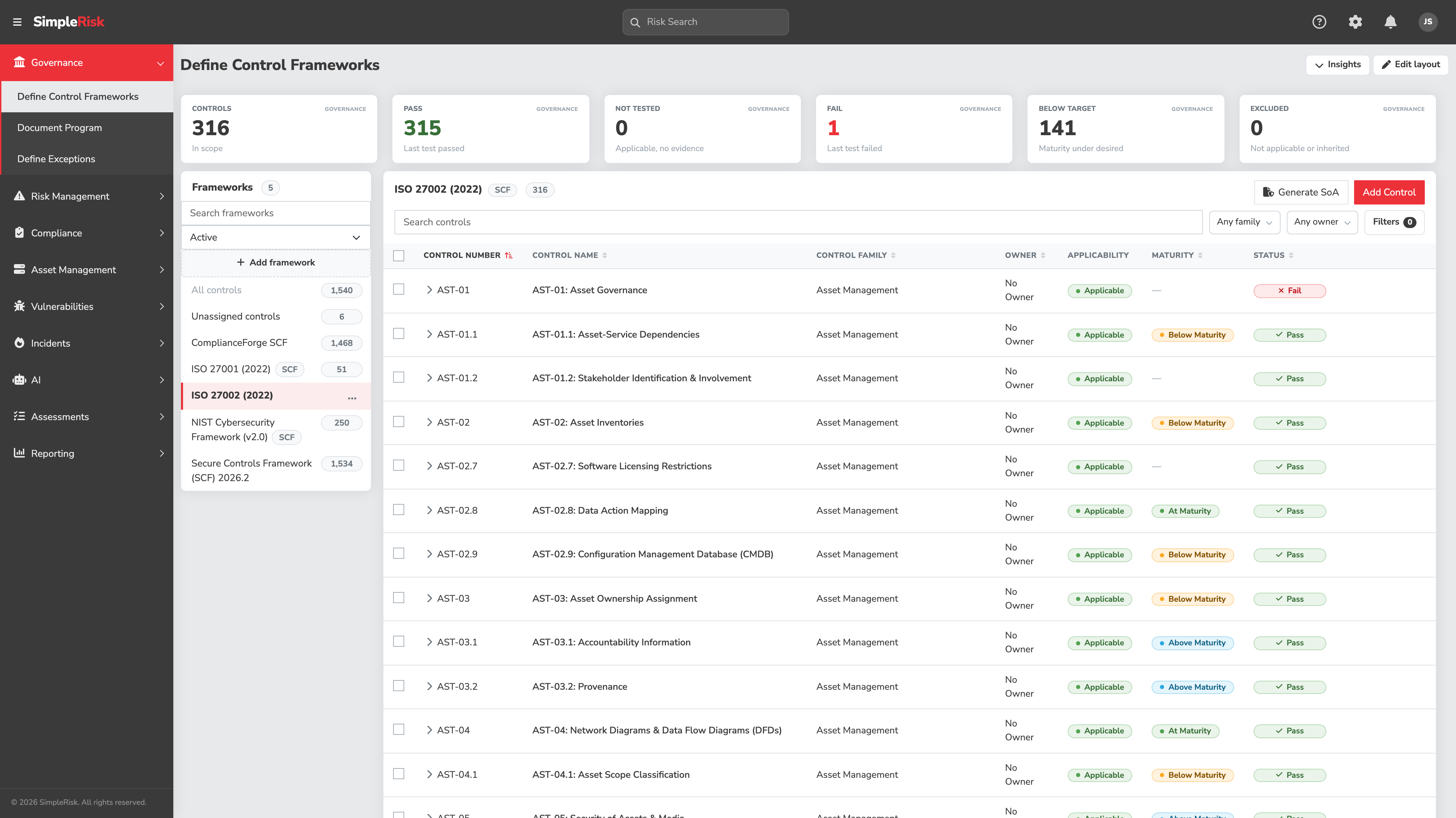
Inactive is not the same as deleted, and the two get confused. A framework's Status is a field on the add and edit modal, set to either Active or Inactive. An inactive framework keeps every one of its controls and every mapping they carry, but it drops out of the default framework list and out of the governance dashboard, so its controls stop appearing where the program does its daily work. Status also travels along the framework tree: deactivating a framework deactivates everything beneath it, and activating one activates its parents. A team that deactivates a parent to tidy up the rail and then can't find a child framework has usually found this rather than a bug.
Deleting is the more consequential act. It removes the framework and nothing else — the controls that belonged to it survive, they just lose that framework's mapping, and any control left mapped to no framework at all turns up under Unassigned controls in the rail. Child frameworks aren't deleted either; they get re-parented to the deleted framework's parent. So deletion doesn't destroy control work, but it does discard the structure that organized it, and nothing brings that structure back. Deactivate when you want a framework out of the way. Delete when you want it gone.
On the control form itself, only Control Short Name is required. Everything else can be filled in later, which is what makes it practical to rough in a skeleton of controls and enrich them over the following weeks. Four of the dropdowns are program-defined rather than fixed: Control Class, Control Phase, Control Priority, and Control Family all read from lists an administrator maintains under Settings cog → Settings Hub → Add and Remove Values. When the vocabulary your auditors use isn't in the dropdown, add it there instead of bending your controls to fit the shipped values.
Three fields carry behavior worth understanding before you populate them:
- Control Type — Standalone, Project, or Enterprise, and a control can hold more than one at a time. It's a classification that the Filters sheet and its facet counts read from. A control created without one is treated as Standalone, which is why every imported or SCF-installed control shows up that way.
- Control Status — Pass, Fail, or Not Tested, and new controls start at Not Tested. In normal use you don't set it by hand: completing a Control Assessment writes it, a Yes answer recording Pass and a No recording Fail. An N/A or unanswered question leaves the existing status untouched, and a respondent without Able to Modify Existing Controls can still run and complete the assessment — the control statuses simply aren't written.
- Mitigation Percent — the credit this control gets when it's attached to a risk mitigation, and the precedence rule catches people out. A percentage set on the mitigation itself wins outright, and the attached controls are ignored entirely. Only when the mitigation carries no percentage of its own do the controls come into play, and then it's the highest single percentage among them that applies rather than the sum. Attaching five 20% controls to a mitigation gets you 20%, not 100%.
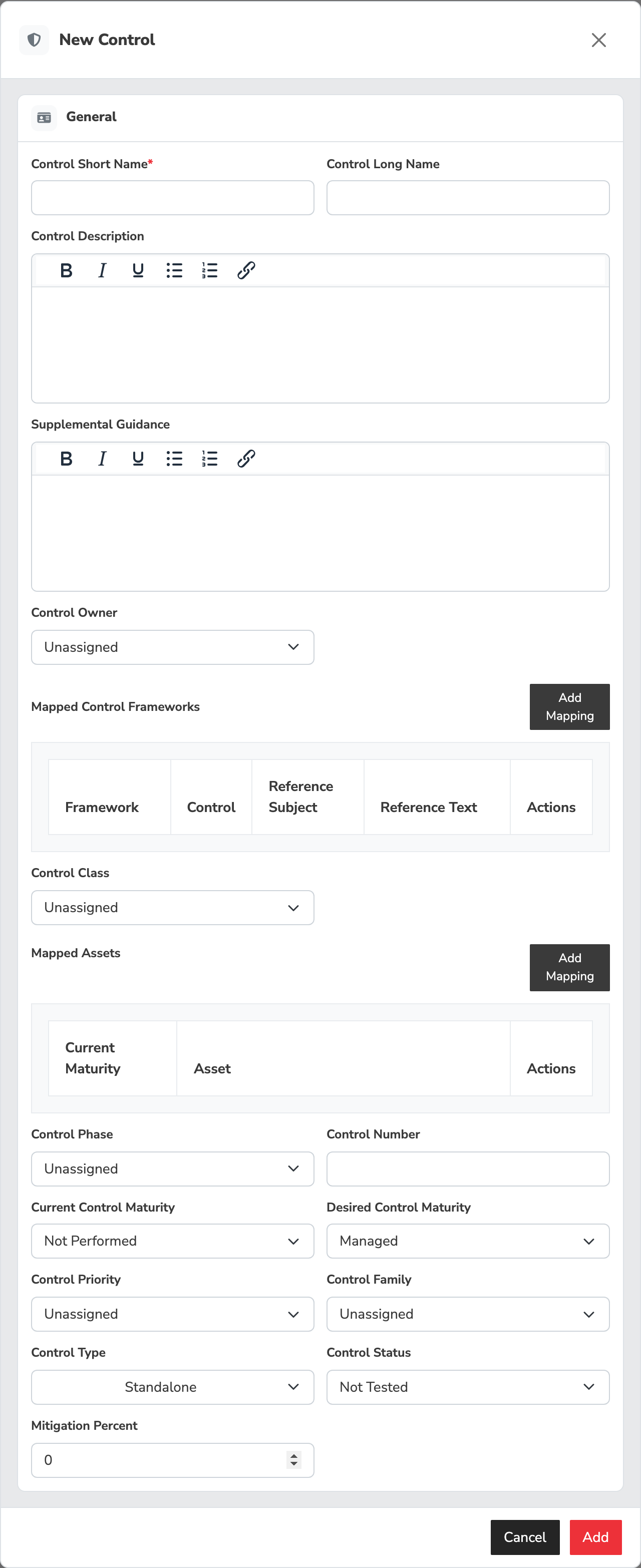
Two things the page doesn't currently do, both worth knowing before you plan work around it. The Mapped Assets section of the control modal renders but isn't wired up, so you can't map an asset to a control from here. And the control edit modal neither shows nor saves framework mappings — mappings are set when a control is created (or cloned) and are otherwise managed as described in Mapping Controls Across Frameworks.
A few SimpleRisk-specific abstractions worth knowing:
- Parent and child controls. A control can be the parent of one or more children. This is how SimpleRisk represents hierarchical frameworks like NIST SP 800-53's control enhancements or ISO 27001's sub-clauses. The UI shows them indented; reporting can roll child results up to the parent.
- Maturity assessment. Each control carries two maturity scores rather than one. Current Control Maturity records where the program actually is; Desired Control Maturity records where it intends to be. Both draw on the same six-level scale — Not Performed, Performed, Documented, Managed, Reviewed, Optimizing — and the distance between them is what the insights band means when it counts controls below their maturity target. The scale itself is fixed. What an administrator sets is the starting point for new controls, under Settings cog → Settings Hub → Preferences tile → Governance tab, as Default Current Maturity and Default Desired Maturity.
- Owner. Every control should have an owner — a named human responsible for the control's day-to-day operation. Controls without owners produce ambiguous accountability when a test fails.
- Applicability. A control is in scope for a framework until somebody records a decision that it isn't. The two deviations are Not applicable (out of scope, with a reason and a justification) and Inherited (someone else performs it on your behalf). The decision is scoped to one framework, so the same control can be excluded from ISO 27001 and still in scope for SOC 2. This is the record an ISO Statement of Applicability is built from, and it's covered in its own article.
Common pitfalls
A handful of patterns recur when teams use the framework-and-control vocabulary.
-
Treating the family code as the control. "We implemented AC" is a sentence customers say sometimes, and it's a category error: AC is a family containing twenty-plus controls, not one of them. Implementing the family means implementing the controls it contains; saying "we implemented AC" without a control-by-control evidence trail produces a SOC 2 report that doesn't survive its first auditor question.
-
Skipping the family/owner assignment when adding controls by hand. Custom controls created in SimpleRisk's UI default to no family and no owner; the program then can't roll up family-level reporting and can't route review reminders to the right person. Set both at creation time; the form supports it because it's load-bearing.
-
Not using parent-child to express hierarchy. Programs sometimes flatten a hierarchical framework into a list of controls with redundant prefixes ("Section 5.1 — XYZ" / "Section 5.1.1 — ABC" / "Section 5.1.2 — DEF") instead of using SimpleRisk's parent field to model the actual tree. The flat representation works but loses the rollup behavior — child results don't naturally aggregate to the parent for reporting. If the framework has a tree, use the tree.
-
Deleting a control that simply doesn't apply. Deletion is permanent — SimpleRisk has no way to restore a deleted control. It also removes the control from every framework it's mapped into, not just the one you were looking at, and leaves no record of why. Mark it Not applicable for that framework instead; the reason and justification are what an auditor asks for.
-
Confusing framework version with framework instance. ISO 27001:2013 and ISO 27001:2022 are different versions of the same framework with substantially different control organizations. Customers sometimes install both and treat them as separate, then discover they're double-counting controls in their reporting. Pick the version your audit conversation expects, install that one, and retire the other (or at minimum mark it inactive).
-
Owner-by-team rather than owner-by-person. SimpleRisk's control owner field is a user picker, not a team picker, for the same reason risk ownership is per-person: a team doesn't take a Slack message about an overdue test, a human does. Use Additional Stakeholders for the team or other people who should be notified; reserve Owner for the one accountable human.
-
Ignoring the maturity fields. Maturity is one of the most useful program-progress metrics SimpleRisk produces, and many programs leave it at the default forever. Two habits fix that. Set Desired Control Maturity once, when the control is created, so the target is a deliberate decision rather than whatever the default was. Then update Current Control Maturity as part of the test-cycle review — when a test passes consistently, raise it; when it fails, drop it. Static maturity is decoration. Maintained maturity is what makes the insights band's below-target count mean something.
-
Deleting a framework to get it out of the way. Deletion isn't the tidy-up tool it looks like. It's permanent, it re-parents any child frameworks to the deleted one's parent, and it strips the framework's mapping from every control that carried it — which can leave a pile of controls under Unassigned controls with no record of what they were organizing. Setting the framework to Inactive achieves what the tidy-up was for and is reversible.
-
Mapping controls to families instead of to other controls. Cross-framework mapping is one-control-to-another-control, not one-control-to-a-family. "AC-2 maps to ISO A.5" doesn't generate testable evidence; "AC-2 maps to ISO A.5.15" does. The mapping UI enforces control-level granularity for this reason; respect it when building mappings by hand.