
Why this matters
A working risk register has dozens to hundreds of risks at any given time, and the program is treating only some of them at any given moment. The treatment work needs to be organized (by team, by quarter, by funding source, by initiative) so leadership can answer "what are we doing about risk this quarter?" without reading every individual risk's mitigation plan. Projects in SimpleRisk are the container for that organization: a named bucket that holds related risks together for treatment-tracking and for program-level rollup reporting.
The other reason this matters: projects are the bridge between operational risk work and the governance forum. The forum wants to read about a small number of initiatives (the cloud migration, the SOC 2 prep, the GDPR enforcement update), not about every individual risk that rolls up under each. Project rollups produce that view automatically — the forum sees ten projects, each with its risk count and treatment status, instead of two hundred risks the forum can't read in the time available. Without project organization, the forum either gets the right level of detail by accident or gets the wrong level every time.
The third thing worth knowing, and this is the load-bearing fact for this article, is that SimpleRisk doesn't distinguish "projects" from "programs". There's a single project entity with four status values (Active, On Hold, Completed, Canceled), and that entity does the work of both. Organizations that use "project" and "program" with different formal meanings (a project is a one-time initiative; a program is a recurring set of related projects) need to encode that distinction themselves, typically by naming convention ("PROG-CloudMigration" vs "PROJ-CloudMigration-Phase1") or by setting one project as a parent that the others reference in their names. There's no programs table to populate.
Before you start
Have these in hand before you open the projects page:
- The Able to Add Projects permission (gates project creation; checked via
$_SESSION["add_projects"]) and the Able to Manage Projects permission (gates reordering and status changes; checked via$_SESSION["manage_projects"]). Without them, the page renders read-only and the drag-drop reordering doesn't work. (See Permission Reference.) - A clear set of initiatives to track. "Project A" and "Project B" with no internal definition produces a project list nobody navigates. "Q3 Cloud Migration" and "SOC 2 Type 2 Prep" tells the reader what each project is and why it exists. Name projects for the initiatives the team actually talks about; the names are the navigation.
- An understanding of what kind of grouping you want. Projects are groupings of risks. They're the right tool when "the risks affecting this initiative" is a meaningful question. They're the wrong tool when the grouping is of controls (use frameworks for that), of documents (use the document hierarchy), or of compliance work (use the compliance module's framework grouping). Don't fight the data model; reach for the right abstraction.
- A read on whether your program treats "project" and "program" as different things. If yes, decide on the naming convention or hierarchy you'll use to express the distinction inside the single project entity. Document the convention so the second person to use the system follows the same pattern as the first.
Step-by-step
1. Open the project planning page
Sidebar: Risk Management → Prioritize Planning opens /management/prioritize_planning.php. The page sits under Risk Management because projects are containers for risks, but conceptually they're a governance-layer abstraction — the page is dual-purpose and the sidebar entry reflects its risk-management origin.
The page renders as a tabbed view organized by project status:
- Active Projects — projects currently being worked on.
- On Hold Projects — paused projects (work suspended but not abandoned).
- Completed Projects — projects whose work is done.
- Canceled Projects — projects discontinued before completion.
Each tab shows the projects in that status as a list of containers; each container shows the risks assigned to that project. The containers are drag-droppable; the risks within each container are drag-droppable.
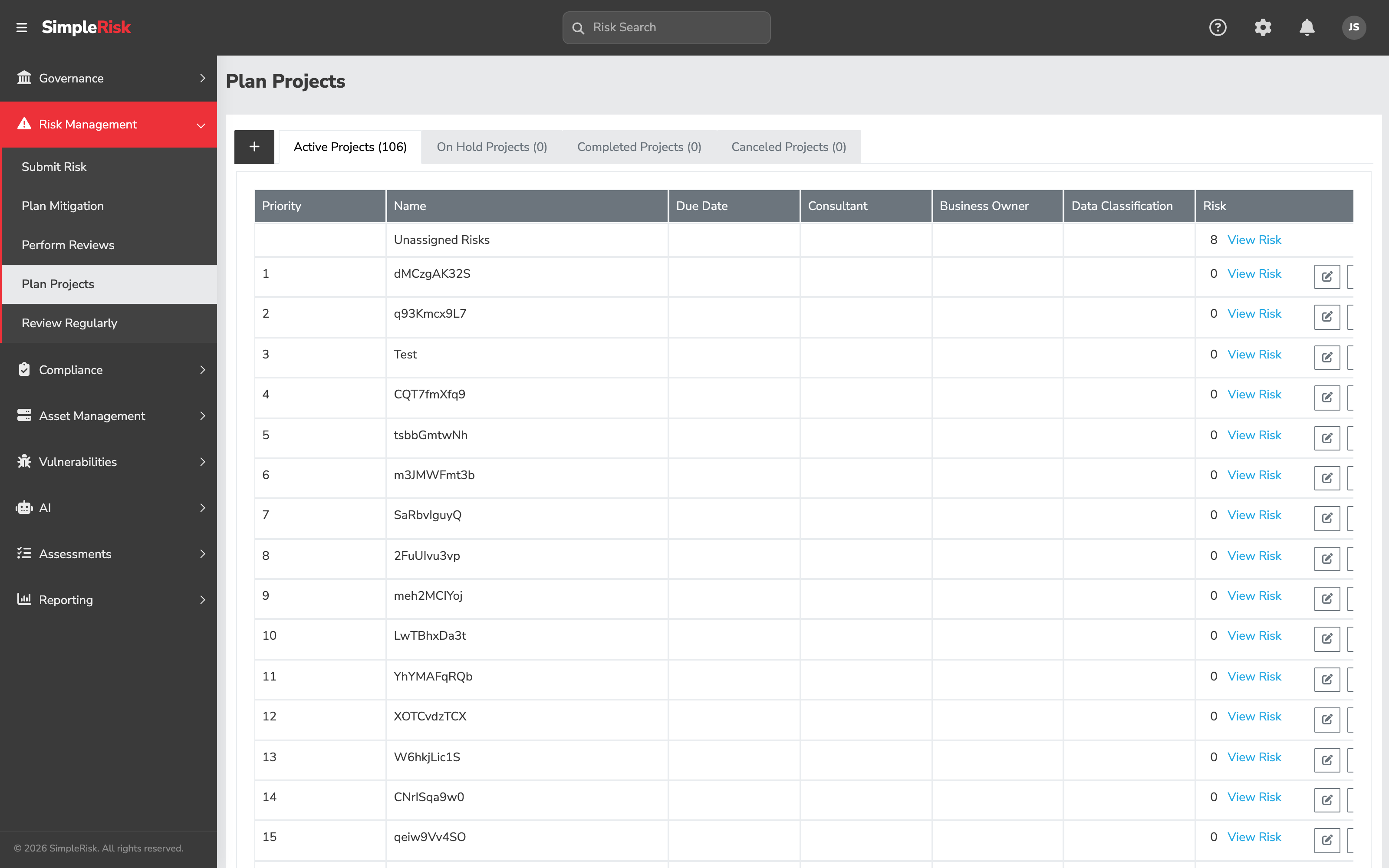
2. Create a new project
Click the Add Project button (the plus icon at the top of the active tab). The form asks for a single field:
- New Project Name — required. The display name for the project. Be specific: "Q3 Cloud Migration" beats "Project."
Click to confirm. SimpleRisk creates the project with status set to Active (status value 1) and an automatic order based on existing projects.
The other status values get assigned later via the status-change controls; new projects always start as Active.
3. Assign risks to the project
Two paths to assign risks to projects:
- Drag-drop on the planning page. The risks panel shows unassigned risks (or risks from other projects) as draggable items. Drag a risk into a project container to assign it. Each drop commits one assignment as it lands.
- Per-risk via the risk's edit form. Open the risk's detail view at
/management/view.php?id={id}. The Risk Details tab has a Project dropdown; pick the target project and save. Same effect, one risk at a time.
The risk-to-project association lives in the the risk's project assignment column. A risk can be assigned to one project at a time; reassigning to a different project replaces the prior assignment.
4. Re-prioritize within the project
The order of risks within a project container expresses the program's working priority. Drag risks up and down within the container to reflect the order the team intends to treat them. The order persists to the database (the project's manual ordering column for the project itself, plus the per-risk ordering within the project).
The order matters for two things:
- The team's working sequence. When the team picks the next risk to actually work on, the top of the project's list is the answer.
- Reporting rollups. Some reports show "the top N risks in this project" — that ordering is what they read.
For programs that don't care about per-risk priority within a project, leave the order alone. The default order is creation date (newest at the bottom).
5. Move projects through their status lifecycle
A project's status changes as the work progresses:
- Active — work is happening.
- On Hold — work is paused (waiting on a dependency, deprioritized for budget reasons, blocked by a personnel change).
- Completed — work is done. Move the project here when the underlying initiative has shipped.
- Canceled — work won't happen. Move the project here when the initiative is dropped without being completed.
Status changes happen via the project's edit modal or via dragging the project to a different tab (depending on theme). The status transition is recorded in the audit log and the project moves out of the source tab and into the destination tab.
A canceled project keeps its risk assignments — the risks themselves don't get unassigned, they just sit in a canceled project's container. Reassign the risks to a different project (or to no project) before canceling the original if you want them in active circulation.
6. Use projects for program-level rollup
For organizations running multiple related projects under a "program" umbrella, the convention is naming-based. A few patterns that work:
- Prefix convention. Name programs with a
PROG-prefix and projects with aPROJ-prefix; reports filter on the prefix to show one tier or the other. - Parent-named convention. Make a single "umbrella" project named for the program (e.g. "GDPR Compliance Program"), and name child projects to reference it (e.g. "GDPR-Data-Mapping," "GDPR-DSAR-Workflow," "GDPR-Vendor-Reviews"). The umbrella project holds risks that are program-level rather than project-specific.
- External grouping. Track the program-to-project relationship in an external tool (a project-management system, a wiki page, a leadership tracker) and treat SimpleRisk's projects as the operational grouping only. This is the path most organizations end up on, because their program tracking exists for reasons SimpleRisk doesn't try to model.
Pick one and document it. Mixing conventions across the project list produces a tracker nobody can navigate.
7. Programmatic project management via the v2 API
The v2 API exposes project creation:
POST /api/v2/management/project/add— create a new project.
The other operations (update, delete, status change) are handled through form posts to the planning page rather than dedicated v2 endpoints — the project entity is lightweight and the operations are mostly UI-driven. For automation, scripted creation via the API is the supported path; bulk renames and status sweeps usually go through the UI.
Common pitfalls
A handful of patterns recur when teams use the projects feature.
-
Creating a project for every risk. A "project" with one risk in it isn't a project; it's a label. Projects exist to group related risks; one-risk projects produce noise without producing rollup value. If a risk doesn't naturally belong with other risks in an initiative, leave it unassigned to any project.
-
Treating Canceled as Delete. Canceling a project keeps it in the database — visible on the Canceled tab, queryable via the API, retained for audit-trail purposes. That's intentional; canceling preserves the record of "we tried this and decided not to continue" while removing the project from active circulation. Use Canceled when the work won't happen; reserve actual deletion for projects created in error.
-
Letting On Hold become a graveyard. A project parked in On Hold for six months is functionally canceled, just less honestly. The On Hold status exists for genuinely-paused work expected to resume in a foreseeable timeframe. When that timeframe expires without the work resuming, move the project to Canceled (or back to Active if the resume actually happens). Letting On Hold accumulate produces a tab full of items the program isn't actually deciding on.
-
Reordering as decision theater. A program that drags risks up and down within a project container weekly without those reorderings affecting which risks actually get worked on is reordering as performance, not as priority-setting. The order is meant to drive the operational queue. If it doesn't, either start treating it as the queue, or leave the order alone and accept that the priority lives elsewhere.
-
Pretending "programs" exist when they don't. SimpleRisk's project entity is the same entity used for both projects and programs. A team that builds workflows assuming a separate programs table — bulk operations, custom reports, integrations — discovers the assumption is wrong only after the workflow is built. Confirm the data model; build for the entity that actually exists. The single project entity is what you have.
-
Risks assigned to a Canceled or Completed project. A risk in a Canceled project sits in a container nobody's looking at. The risk itself is still active in the register, but its project association is now misleading — anyone reading "this risk is part of
" gets a confusing signal. When canceling or completing a project, sweep the still-active risks out to a different project (or to no project) first. -
Project name drift. A project named "Q3 Cloud Migration" stays named that way even when it's still running in Q1 of the following year. The name fossilized; the underlying initiative kept going. Rename projects when their scope or timeline changes; the name is the navigation, and stale names are bad signage.
-
No retrospective on completed projects. A project marked Completed and then ignored is missing the learning step. The risks that landed in the project, the treatment work that happened, the residual exposure that's left — all of it is data the program can use to calibrate future treatment estimates. Spend ten minutes on a brief retrospective when completing a project; the lessons compound.