
Why this matters
An exception is a formally-recorded deviation from a policy or a control: a system that doesn't meet the encryption requirement the policy mandates, a vendor that doesn't have the SOC 2 attestation the standard requires, a control that can't be tested because the underlying environment is being decommissioned. Reality routinely diverges from policy as written; the exception process is what records the divergence honestly instead of pretending it doesn't exist.
The discipline of using the exception process is what separates a program that knows where the gaps are from one that has gaps it can't name. A policy that says "all production systems use TLS 1.3" is enforceable when the program tracks the systems that don't and the date by which they will. The same policy without an exception process produces a posture where leadership thinks the policy is met because nobody's filed the dissent that says otherwise. The auditor will eventually notice; the exception register is the evidence that the program noticed first.
The other reason exceptions matter: they're the relief valve that keeps policies workable. A policy with no exception path encourages the wrong behaviors — quiet non-compliance, plausibly-deniable workarounds, the team that decides not to escalate because the answer is going to be "no anyway." A working exception process lets the right exceptions go through with the right scrutiny, which keeps the policy meaningful for the cases where it should bind. Programs that try to operate without an exception process end up with policies everyone knows are aspirational and nothing actually enforces.
The load-bearing SimpleRisk-specific behavior to know up front: updating an approved exception automatically resets it to unapproved. The string 'ExceptionUpdateResetsApproval' => 'Updating an exception makes it unapproved' is the in-product confirmation. This is intentional and correct (a substantive change to the exception's scope, justification, or expiration should require fresh approval) but it surprises new users who expect minor edits to preserve the prior approval. Plan around it.
Before you start
Have these in hand before you open the exceptions page:
- The right permission for the action you're taking. The exceptions module has a finer-grained permission set than most: Able to View Exceptions for read access, Able to Create Exceptions for filing new exceptions, Able to Update Exceptions for editing, Able to Delete Exceptions for removal, and Able to Approve Exceptions for the approval action specifically. Approval is gated separately from the other permissions because approval carries policy weight. (See Permission Reference.)
- A clear answer to what the exception is to. SimpleRisk distinguishes two exception types:
- Policy Exceptions — deviations from a specific policy document in the documentation library.
- Control Exceptions — deviations from a specific framework control. Pick the type that matches the underlying obligation; both produce the same workflow but the rollups differ.
- A named owner (the person responsible for the exception's resolution) and a named approver (the person whose authorization the exception requires). The approver should have policy-approval authority appropriate to the exception's scope; an exception affecting customer data shouldn't be approved by the same engineer who's asking for it.
- A justification that survives scrutiny. The point of the field isn't to invent a defensible-sounding reason; it's to capture the actual operational reality. "Supplier doesn't yet have SOC 2; their renewal is in Q3 and we have a contractual commitment to switch if they don't deliver" is honest. "Compensating controls in place" is theater.
- A next-review date that matches how long the exception should reasonably last. Not "as long as we need" — that's a permanent exception in disguise. Pick the date the team genuinely expects the underlying issue to be resolved by. If that date is more than a year out, the exception is probably actually a permanent risk-acceptance decision that belongs in the risk register rather than the exception register.
Step-by-step
1. Open the exceptions page
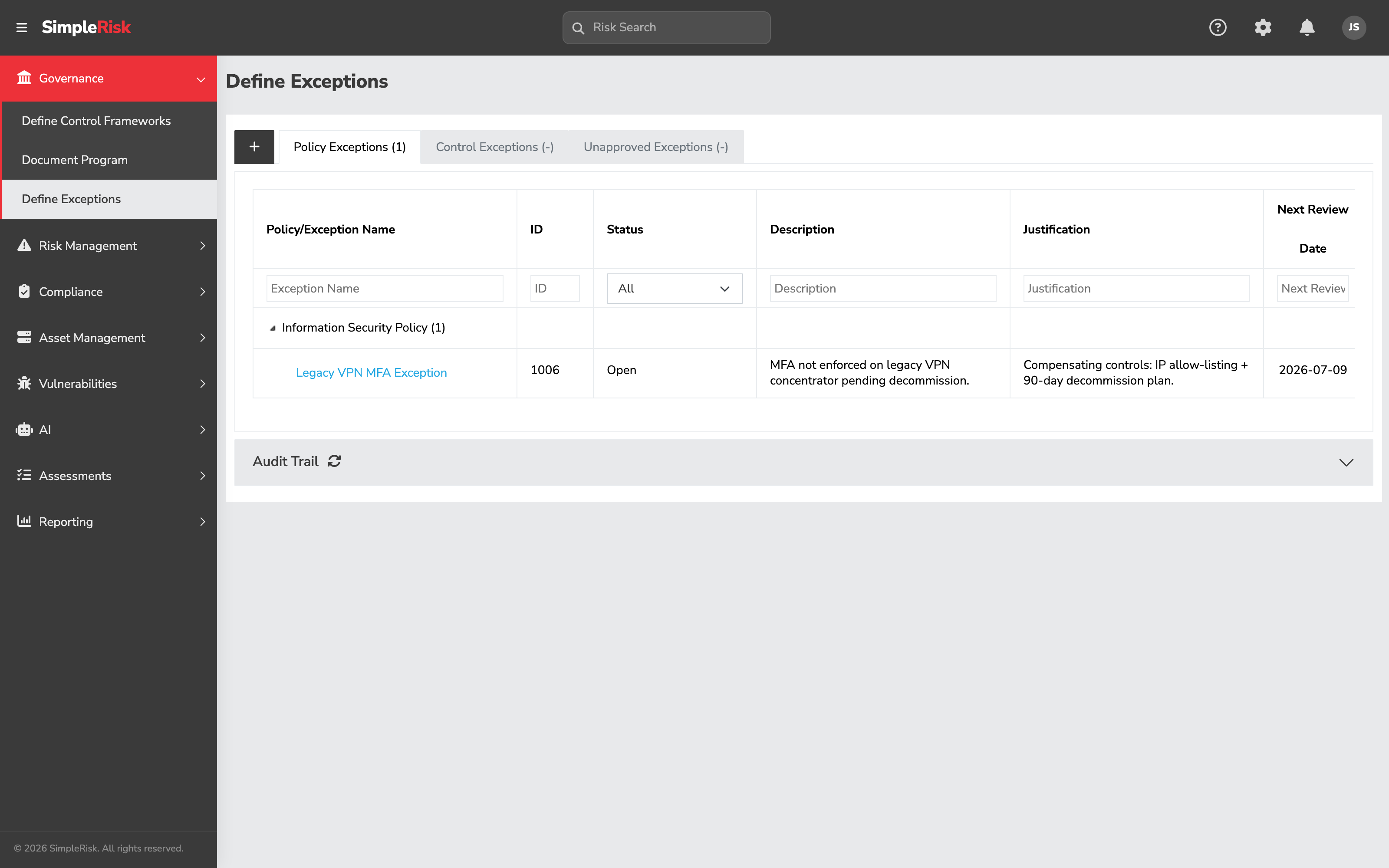
Sidebar: Governance → Define Exceptions opens /governance/document_exceptions.php. (The URL keeps the older document_exceptions name; the menu entry reads Define Exceptions.) The page renders three tabbed views:
- Policy Exceptions — exceptions to documents in the policy library.
- Control Exceptions — exceptions to specific framework controls.
- Unapproved Exceptions — exceptions filed but not yet approved (drawn from both the policy and control sides).
The Unapproved Exceptions tab is the working queue for approvers; the policy and control tabs are the operational views for owners.
2. Create the exception
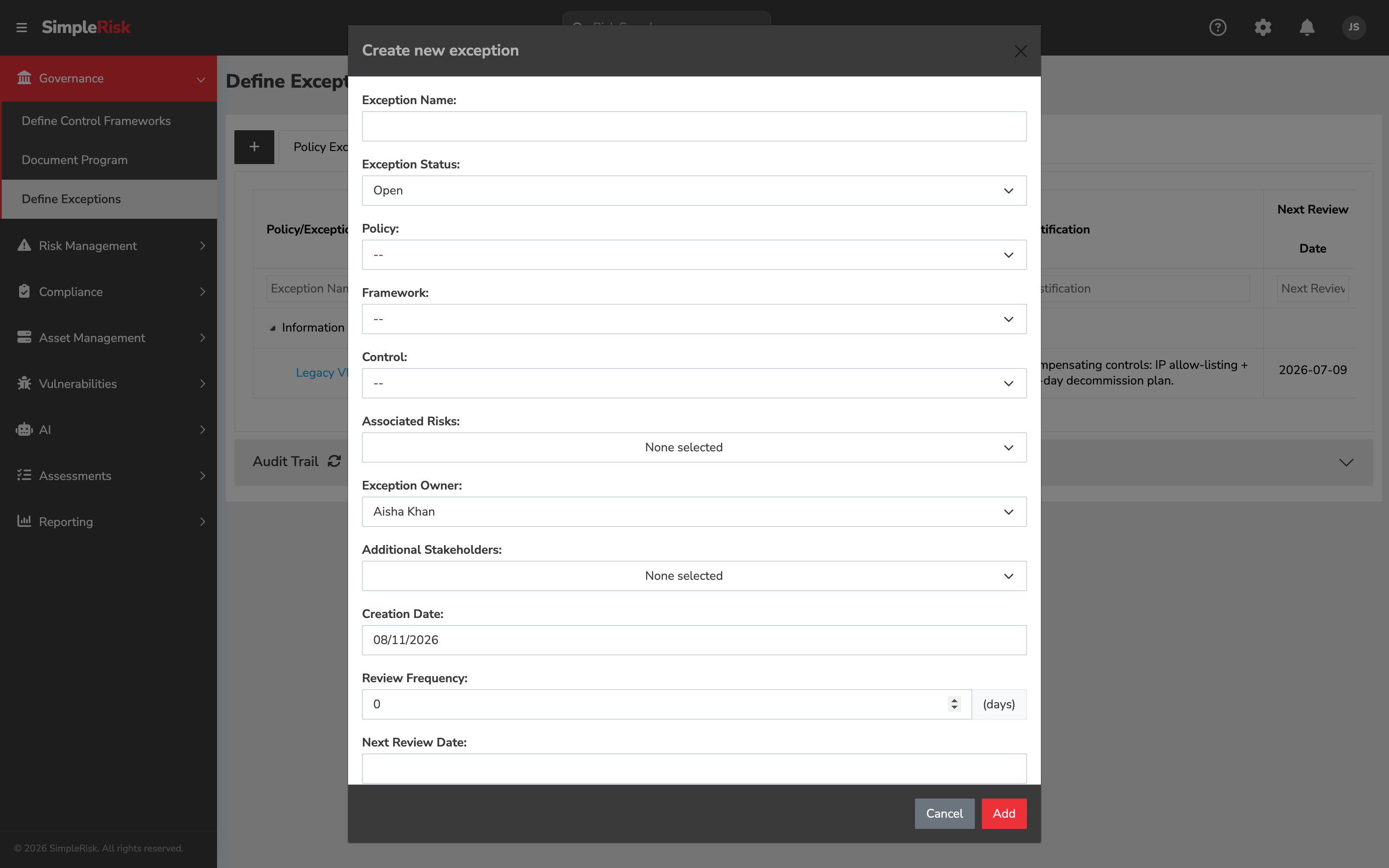
Click Add Exception at the top of the appropriate tab. The form fields:
- Exception Type — pre-set based on the tab you're on (policy or control), but editable. Determines what the exception applies to.
- Exception Name — required. A short descriptive name. "Production database TLS exception" is more useful than "Exception."
- Policy Name (for policy exceptions) or Framework Control (for control exceptions) — picker for the underlying obligation the exception is to. Pick from the installed documents or controls.
- Exception Owner — single-user picker. The person responsible for resolving the exception (or for re-justifying it on renewal).
- Approver — single-user picker. The person whose authorization the exception requires. Often a different person from the owner.
- Description — free-text textarea describing what the exception covers. Be specific about scope: which systems, which environments, which time periods.
- Justification — free-text textarea describing why the exception is necessary. The audit conversation later reads this field; spend the time on it.
- Creation Date — auto-populated to today.
- Approval Date — left blank at creation; filled in when the approver approves.
- Review Frequency — number of days between scheduled re-reviews. Common values: 90 for high-impact exceptions, 180 for medium, 365 for low-impact.
- Next Review Date — auto-calculated from creation + review frequency, but editable. The expiration anchor: when this date arrives, the exception comes due for renewal review.
- Additional Stakeholders — multi-user picker. People notified about exception status changes; useful for keeping affected teams in the loop.
- Associated Risks — link to risks in the risk register that the exception relates to. The link is what surfaces "we have an open exception on this control" when reviewing the related risk.
Click Save Exception. The exception lands in the Unapproved Exceptions tab with status set accordingly.
3. Route the exception for approval
Notify the assigned approver that the exception is filed and awaiting their decision. SimpleRisk doesn't auto-route — the Additional Stakeholders notification fires when the exception is created (if the email cron is configured), but the actual workflow is "tell the approver to look at the queue."
The approver opens the Unapproved Exceptions tab, finds the exception, and reviews it. The approval form (or the decision controls within the exception's edit modal) presents the choices:
- Approve — the exception is acceptable as written. Marks it approved, stamps today as the approval date, and moves it out of the unapproved queue.
- Reject / Return for revision — the exception isn't acceptable as written. The approver leaves the exception unapproved and the owner has to either revise it or accept that the underlying issue must be resolved within the policy as written.
The v2 API exposes both actions:
POST /api/v2/exceptions/approve— record an approval.POST /api/v2/exceptions/unapprove— reverse a prior approval (separate from update, because explicit unapproval is a recordable action).
Approval requires the Able to Approve Exceptions permission. The approver should be a different person from the owner — self-approval defeats the point of the workflow.
4. Live with the approved exception
Once approved, the exception sits in its policy or control tab with Approved status, Approval Date set, and Next Review Date anchoring the renewal cycle. The audit trail (visible via GET /api/v2/exceptions/audit_log) records the creation, the approval, and any subsequent updates.
Two things to know about the active period:
- The exception is visible to the auditor during this period. Approved exceptions are part of the program's documented state — an auditor reading the program will see them and ask about them. The justification field is what defends the exception's existence; the next-review date is what proves the program isn't treating it as permanent.
- The exception affects the related risk. If the exception is associated with a risk in the register, the risk's view shows the exception as additional context. Programs sometimes use the linkage as a way to track "this risk is currently being lived with via an approved exception" rather than treating it as actively-mitigated.
5. Renew (or close) when the next-review date arrives
The exception comes due when Next Review Date lands. The owner reopens the exception and decides:
- The underlying issue is resolved. The exception is no longer needed; close it (delete or mark with a closed status, depending on install configuration). The closure preserves the audit trail of the exception having existed.
- The underlying issue persists and the exception is still justified. Update the exception with refreshed justification and a new next-review date. Updating triggers re-approval: the exception's
approvedflag resets to false, and the approver has to sign off again. This is intentional — the renewal is a fresh decision, not a checkbox. - The underlying issue persists and the exception is no longer justified. The team has to either make the underlying change (bring the system into compliance) or escalate to formal risk acceptance through the risk register, which is a different decision with different governance weight.
The renewal-resets-approval rule is what keeps exceptions from becoming permanent by inattention. A program that lets approved exceptions auto-renew without re-approval ends up with a register full of items that were approved in 2019 and have been silently auto-renewing since.
6. Programmatic exception management via the v2 API
For automation (bulk renewals, status sync with an external GRC tool, scripted reporting) the v2 API exposes the operations:
GET /api/v2/exceptions/exception?id={id}— fetch a single exception.GET /api/v2/exceptions/info?id={id}&type={policy|control}&approval={0|1}— fetch the exception with the data needed for the display or approval modal.GET /api/v2/exceptions/tree?type={policy|control|unapproved}— fetch the hierarchical view of exceptions for a tab.GET /api/v2/exceptions/status— fetch the status enum.GET /api/v2/exceptions/audit_log— fetch the audit trail of changes.POST /api/v2/exceptions/create— create a new exception.POST /api/v2/exceptions/update— update an existing exception (resets approval).POST /api/v2/exceptions/approve— approve an exception.POST /api/v2/exceptions/unapprove— reverse an approval.POST /api/v2/exceptions/delete— delete one exception.POST /api/v2/exceptions/batch-delete— delete multiple exceptions at once.
The batch-delete endpoint is the one bulk-write operation in the exception API; the rest are per-exception. Iterate the per-exception endpoints from a script for bulk update or approval workflows.
Common pitfalls
A handful of patterns recur when teams operate the exception process.
-
Self-approval. A user who creates an exception and then approves it themselves is documenting a decision rather than making one. Even when the same person genuinely has both authorities, route the approval through a different reviewer to keep the process honest. SimpleRisk's permission model supports the split (Able to Create ≠ Able to Approve); use the split.
-
Permanent exceptions disguised as temporary. An exception with a next-review date set to "five years from today" is functionally a permanent decision dressed up as a temporary one. If the underlying issue genuinely won't resolve in a foreseeable timeframe, the right artifact is a formally accepted risk in the risk register, not a perpetually-renewing exception. Use the exception process for genuinely temporary deviations.
-
Justifications that don't survive scrutiny. "Compensating controls in place" without naming the controls is theater. "Risk accepted by management" without identifying the management decision is theater. The justification has to be specific enough that an auditor reading it understands why the deviation is acceptable. Generic reassurances don't survive a serious audit conversation.
-
Updating without realizing approval resets. A user makes a "small" edit (fixes a typo, clarifies a sentence) and the exception's approved flag flips to false. The exception leaves the active register and lands back in the unapproved queue, sometimes silently. Expect this and route to the approver after every update; or, for cosmetic-only changes, leave the existing record alone and add the clarification to the description on the next renewal.
-
Exception register that grows and grows. A program where new exceptions get filed faster than old ones get resolved produces a register that climbs steadily, and after a year it's hundreds of items long with the genuinely active ones lost in the noise. Track the rate and the resolution time as a program metric; if exceptions are accumulating, the underlying problem is either the policy is wrong (revise it) or the program isn't doing the resolution work (resource it differently).
-
No link to the affected risk. An exception filed in isolation from the risk register produces two views of the same gap that don't reference each other. The auditor reads the risk register and doesn't see the exception; reads the exception register and doesn't see the risk. Use the Associated Risks field to link the two; the linkage is what makes the picture coherent across views.
-
Over-broad exception scope. "Exception to the encryption policy for the production environment" is too broad — it covers every system in the environment, every encryption requirement, every time period. The auditor will ask "which systems specifically" and the answer reconstructed from memory will surprise everyone. File narrower exceptions; an exception per system per requirement is better than one global exception that gets renewed quarterly without anyone re-reading it.
-
Exceptions filed and then forgotten. The next-review date drives the renewal cadence, but only if the team actually checks the dashboard. Programs sometimes file exceptions, approve them, and then leave them to expire without action. The expired-exception state is its own kind of audit finding (the program knew about a deviation, recorded it, and let the documentation lapse). Schedule a recurring exception-renewal review in the governance forum.