
Why this matters
SimpleRisk releases roughly every two to three months. Each release ships application code changes, sometimes ships database schema changes, and accumulates against the prior release rather than replacing it. Upgrades are how an installation moves from one release to the next; the upgrade is what runs the schema migrations that keep the database in sync with the application code.
Understanding the upgrade architecture matters because it shapes the operator's mental model for everything else in this chapter. Once you know that:
- The application code carries one version stamp, and the database carries another.
- After you swap the files but before you run the database upgrade, those two stamps disagree. That's normal, and it's the state the upgrade exists to resolve.
- The upgrade walks the chain of releases, one hop at a time, until the database stamp catches up with the application stamp.
- The chain covers every release SimpleRisk has ever shipped, so an instance years behind can still walk forward to current.
- Each hop finishes by stamping the database at that release before the next one starts.
— then the deployment-specific upgrade workflows (Upgrading via Docker, Upgrading on Bare Metal, Upgrading Extras) all make sense as variations on the same underlying mechanism.
The other thing worth knowing: upgrades are not optional. SimpleRisk's release cadence includes security patches that don't backport to old versions. An installation running on a version released two years ago is exposed to whatever security issues have been fixed since. The upgrade discipline is part of the program's security posture, not an optional convenience.
The third thing: Extras upgrade separately from Core. Each Extra tracks its own version and walks its own chain. A Core upgrade doesn't automatically bring the Extras forward — they have their own workflow, documented in Upgrading Extras.
How frameworks describe this
Frameworks generally don't prescribe specific upgrade processes (that's vendor-specific) but they do require organizations to keep their software current as part of broader vulnerability management.
- NIST SP 800-53 SI-2 (Flaw Remediation) explicitly mandates that the organization identify, report, and correct information system flaws, including patches and updates. SimpleRisk upgrades fit under SI-2 directly.
- CIS Critical Security Controls v8 Control 7 (Continuous Vulnerability Management) includes patching as a core practice.
- PCI DSS v4.0 Requirement 6.3.3 mandates that all in-scope system components have all known security vulnerabilities addressed within an organization-defined timeframe (typically 30 days for critical, 90 days for high).
- ISO/IEC 27001 Annex A
A.8.8(Management of technical vulnerabilities) requires the organization to have a documented vulnerability-management process that includes timely patching.
For programs running SimpleRisk under any of these regimes, "we're still on the version from 18 months ago" isn't a defensible answer. The upgrade cadence needs to keep pace with the release cadence, with documented exception handling for cases where an upgrade has to wait.
How SimpleRisk implements this
Version stamps
Two version values matter, and both are shown to you on the upgrade page:
- The application version — the version of the code currently deployed. It changes the moment you swap the files.
- The database version — the version the schema is currently at. It changes only when you run the upgrade.
Both use the same YYYYMMDD-VVV format, so a release reads as something like 20260422-001.
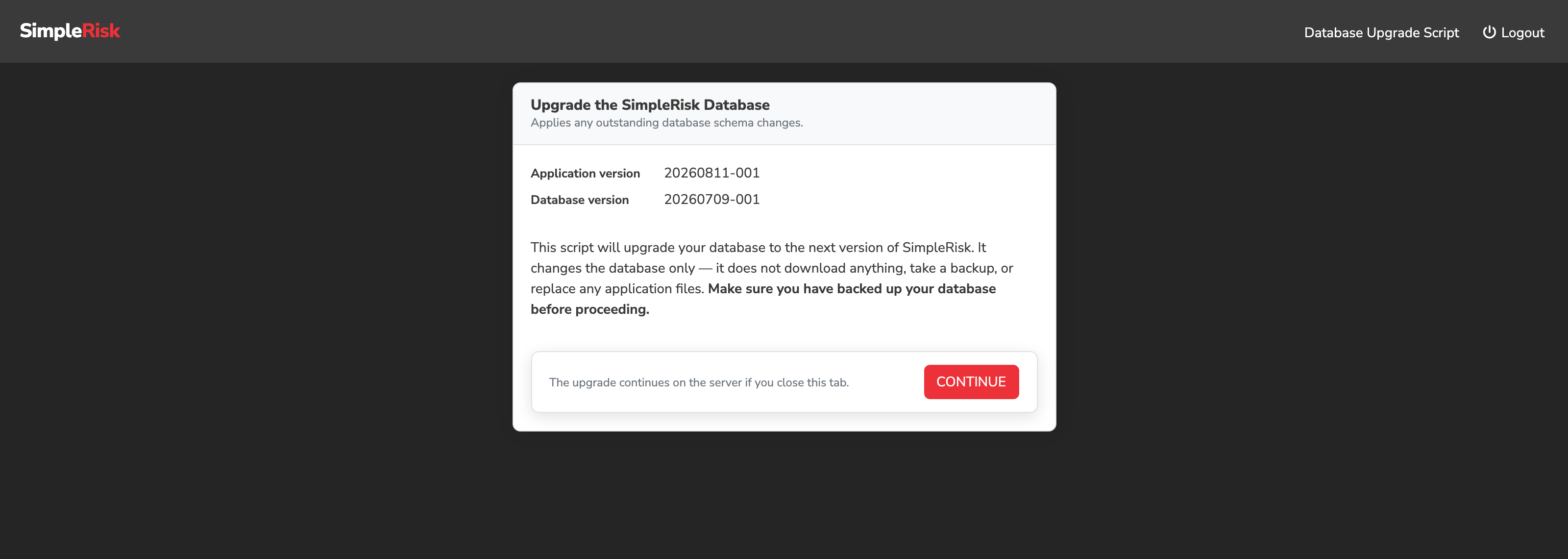
The two are allowed to disagree, and for a short window they always will. Swap the Docker image or extract the new tarball and the application version jumps to the new release while the database version stays on the old one. That's exactly the state the upgrade resolves: it brings the database version up to match the application version. If you ever find the two disagreeing when you didn't expect it, that's the tell that the file swap happened and the database upgrade didn't.
The release chain
SimpleRisk knows the full ordered list of every version it has ever shipped, stretching back to 2014, and it knows how to move the schema from each one to the next. That list is the release chain, and it's what makes a multi-version jump safe.
The upgrade doesn't leap from your version to the newest one. It walks — applying one release's schema changes, stamping the database at that release, then looking again to see whether there's further to go. An instance three releases behind runs three migrations in order, in a single pass, without you doing anything different from an instance one release behind.
Two properties matter operationally:
- Each hop is stamped before the next begins. If something fails partway through a long chain, the database is left cleanly at the last release that completed rather than somewhere between two. Fix the cause and re-run; the upgrade picks up from where it stopped rather than starting over.
- Two upgrades can't run at once. Every route into the upgrade takes an instance-wide lock for the duration of its run. A second one that starts while the first is in flight is turned away with a message saying an upgrade is already running, rather than being queued behind it or — worse — interleaved with it.
That second guard matters most on hosted instances, where fleet automation calls the upgrade endpoint on a schedule and can collide with an administrator who has just clicked Upgrade in the browser. The refused caller changes nothing.
The upgrade UI and API
Two operator-facing entry points:
/admin/upgrade.php— the browser-based upgrade UI. Requires admin login. Walks the schema upgrade and reports progress. Use this for interactive upgrades.GET /api/upgrade/upgrade/simplerisk/db— the API entry point for programmatic upgrades. Authenticates via the standard API key mechanism. Use this for scripted upgrades or for orchestration in CI/CD-driven deployments.
A third entry point, POST /api/v2/admin/upgrade/db, brings the database fully up to date from wherever it currently sits and returns a structured per-release result. Called with no version parameter it walks the whole chain; called with one it applies that single release. It is the endpoint to reach for when you want a machine-readable answer rather than a progress page.
Several related API routes exist for full-stack upgrade orchestration:
GET /api/upgrade/version/app— get the current application version.GET /api/upgrade/backup/app— back up the application files (used in the standard upgrade workflow).GET /api/upgrade/backup/db— back up the database (used in the standard upgrade workflow).GET /api/upgrade/upgrade/simplerisk/app— upgrade the application files (Docker image swap, file replacement; the API endpoint orchestrates this for some deployment shapes).GET /api/upgrade/upgrade/simplerisk/db— run the database upgrade (the main programmatic entry point).- Per-extra:
GET /api/{extra_name}/upgrade/appfor each Extra's upgrade.
These endpoints come from the Upgrade Extra, which may need activating first. The Extra is free, but it's gated on registering the instance — until the installation is registered there's nothing to activate, and none of the API routes above exist. Registration is a one-time step covered in Registration and Licensing. On installations that don't register and activate it, the browser-based /admin/upgrade.php is the upgrade path, and it's a complete one.
Special handling during upgrade
The upgrade flow deliberately bypasses several security checks that apply during normal operation:
- Account lockout after failed login attempts — disabled during upgrade, so an admin locked out of normal sessions can still log in to run an upgrade.
- MFA enforcement — disabled during upgrade.
- Forced password change — disabled during upgrade.
The reasoning: an upgrade is by definition a recovery scenario where the database schema may be mid-migration; requiring the full normal-operation security flow could prevent the operator from completing the upgrade. The trade-off is documented; if your security policy doesn't permit the bypass, run upgrades from a controlled environment with the same physical/network controls you'd require for any privileged operation.
The upgrade flow also runs in its own session namespace (SimpleRiskDBUpgrade rather than the main app session) so an upgrade in progress doesn't contaminate normal user sessions.
What the operator sees during a one-click upgrade
An instance running the Upgrade Extra no longer watches a single long-lived HTTP response scroll past. Clicking Upgrade starts a background job and returns immediately; the page then polls for that job's state and draws a list of named steps — check the version, refresh the Upgrade Extra, back up the application, back up the database, swap the files, migrate the schema — each carrying its own state and the messages the upgrade functions produced underneath it.
Two consequences are worth knowing before you run one:
- Closing the tab does not stop the upgrade. The work runs in its own process. Reopening the page re-attaches to the job in progress rather than starting a second one.
- A step that is skipped says so. An instance already on the current release swaps no files and migrates no schema, and those steps are marked Not needed rather than left blank — a blank step is indistinguishable from one that failed.
The upgrade backups this flow takes are registered like any other, so they appear under Configure > Backups alongside manually-taken ones.
Upgrading as far as your PHP allows
Each SimpleRisk release declares a minimum PHP version. An instance several releases behind is frequently running a PHP that the newest release will not run on — historically that refused the upgrade outright and left the instance exactly where it was, which is the worst of both outcomes.
The Upgrade Extra now carries a table of the minimum PHP each release requires and checks it before every hop. An instance on PHP 7.4 is walked forward release by release to the last one that supports 7.4, and stops there with a message naming the release that blocked it, the PHP version that release needs, and how much further raising PHP would get them. Upgrade PHP and run the upgrade again to continue.
Releases predating the table (pre-2021) carry no entry and are treated as unconstrained — silence never blocks an upgrade, since the table exists only to stop one.
Post-upgrade housekeeping
Once the release chain finishes, the upgrade runs two normalization passes over the database:
- Storage engine — anything still on MyISAM from a much older install is moved to InnoDB, so the whole schema gets transactional consistency.
- Character set — every table is moved to full UTF-8 (
utf8mb4), which is what the multi-language UI needs to store the full Unicode range.
Both passes are safe to re-run; on an already-normalized database they do nothing. And every route into the upgrade runs them — the browser UI, one-click, both API endpoints, and the Upgrade Extra.
That last part was not always true, and it's worth knowing if you maintain instances that have been upgraded different ways over the years. Instances upgraded through the API used to finish on the older three-byte UTF-8 while the same instance upgraded through the browser finished on four-byte. Because MySQL widens columns when it converts to a wider character set, that left the two on genuinely different column types, not just different collations. Whichever route you take now lands on the same schema.
If a single table refuses to convert — a legacy sessions table with an over-wide primary key is the classic case — it's logged and skipped rather than aborting the pass. One obstinate table no longer leaves every table after it unconverted.
Database privilege requirements
Before it changes anything, the upgrade checks that SimpleRisk's MySQL user holds the privileges it will need: SELECT, INSERT, UPDATE, DELETE, CREATE, DROP, ALTER, REFERENCES, and INDEX. These are the same privileges the initial install granted (Step 6 of the wizard), so an untouched instance already has them — upgrades ask for nothing extra.
If the check fails, because the privileges were narrowed after install or because a different MySQL user is in play, the upgrade stops and names the missing privileges rather than failing partway through a migration. Grant them temporarily for the upgrade, or point the upgrade at a connection that has them.
Common pitfalls
A handful of patterns recur with SimpleRisk upgrades.
-
Skipping the application-files step. The two-part upgrade is "swap the files" (new image or new tarball) plus "run the database upgrade." Skipping the file swap leaves the application code at the old version even after the database has migrated; the symptoms range from confusing UI behavior to outright errors. Always do both parts; the deployment-shape-specific articles (Upgrading via Docker, Upgrading on Bare Metal) document the specific sequence.
-
Skipping the database upgrade after the file swap. The mirror failure: new application code, old database schema. The application starts erroring as code paths try to use schema elements that don't exist yet. After replacing the application files, run the database upgrade promptly — either via
/admin/upgrade.phpor viaGET /api/upgrade/upgrade/simplerisk/db. -
Upgrading without a backup. The single most common operator regret. The upgrade is generally reliable but the schema changes are not trivially reversible without a database backup. Take a backup before any upgrade; see Database Backup and Restore. The backup is the rollback path; without it, a failed upgrade is recoverable only by running the upgrade forward through whatever issue blocked it.
-
Letting the upgrade chain stretch too far. Skipping releases is supported (the chain handles it), but the longer the chain, the more upgrade functions run in series, and the more chance for a failure mid-chain to leave the database in an indeterminate state. For installations that have skipped many releases, consider upgrading through intermediate versions (release-by-release) rather than jumping the entire gap in one upgrade. The intermediate steps are testable independently.
-
Not reading the release notes. Each release's notes (under
release_notes/in the SimpleRisk repository) document what changed, including upgrade-specific notes (data migrations that take significant time, configuration settings that need attention, deprecations). Reading the notes for the versions you're skipping over is part of the upgrade preparation. -
Forgetting to upgrade the Extras. Core upgrades don't trigger Extra upgrades. After a Core upgrade, walk the activated Extras and verify each is at the version expected for the new Core release. The per-Extra upgrade workflow is in Upgrading Extras.
-
Running the upgrade UI from a session that's about to time out. Long upgrades (multi-version chains, large databases) can take many minutes. A session that times out mid-upgrade can leave the operator unable to monitor the completion. Use the API path for long upgrades, or extend the session timeout temporarily.
-
Running the upgrade against a database with active production load. The schema changes can lock tables or run for minutes; concurrent application traffic against the same tables can fail. For high-traffic installations, schedule the upgrade during a maintenance window with the application disabled (or in maintenance mode) for the duration of the upgrade.
-
Treating the upgrade-mode security bypass as a permanent escape hatch. The bypass exists for upgrade-time scenarios. Don't rely on it for routine admin access; if you're doing admin work outside an actual upgrade, run through the normal authentication flow (with MFA if configured).