---
title: 01.10 Registration and Licensing
description: Register the instance, read the Licenses page, and understand why a paid Extra you have bought can still show as Disabled — plus the one button that…
---
[Skip to content](https://support.simplerisk.com/kb/01-10-registration-and-licensing#main-content)
English
Show submenu for translations
[Customer portal](https://support.simplerisk.com/tickets?hsLang=en)
[](https://www.simplerisk.com/)
Open main navigation
Close main navigation
- English
Show submenu for translations
- [Customer portal](https://support.simplerisk.com/tickets)
- [Contact us](https://www.simplerisk.com/about-us/contact-us)
[Contact us](https://www.simplerisk.com/about-us/contact-us)
How can we help you?
- There are no suggestions because the search field is empty.
1. [SimpleRisk Knowledge Base](https://support.simplerisk.com/kb?hsLang=en)
2. [Administrator Guide](https://support.simplerisk.com/kb/administrator-guide?hsLang=en)
3. [01 Installation and Deployment](https://support.simplerisk.com/kb/administrator-guide?hsLang=en#01-installation-and-deployment)
# 01.10 Registration and Licensing
## Register the instance, read the Licenses page, and understand why a paid Extra you have bought can still show as Disabled — plus the one button that usually fixes it.
## Why this matters
Registration and licensing sit between "SimpleRisk is installed" and "SimpleRisk does the thing you bought it for." Neither is glamorous, and both are invisible right up to the moment an Extra you are certain you paid for refuses to turn on.
The failure is quiet and it looks like a bug. You open the Extras list, find the Extra, and it reads **Disabled** with no explanation and nothing to click. Nothing in that view tells you the problem is a stale license cache rather than a missing entitlement, and nothing suggests where to go next. Administrators lose real time to this, usually with a support ticket in the middle of it.
There is a second reason to care. Registration is what unlocks the two Extras SimpleRisk gives you for free: the **Upgrade Extra**, which turns upgrades into a button rather than a maintenance window, and the **Secure Controls Framework (SCF) Extra**, which imports a large control catalog and its cross-framework mappings into Governance. An unregistered instance is missing both, and most operators do not realise they are entitled to them.
## Before you start
- **The administrator role.** Both pages live behind the Settings cog and are admin-only.
- **Outbound HTTPS to `licensing.simplerisk.com`.** This is the load-bearing prerequisite. Registration posts there, and the license cache refreshes from there. If your egress is filtered, allow that host before anything else in this article will work. The [Initial Configuration Wizard](https://support.simplerisk.com/kb/01-05-the-initial-configuration-wizard?hsLang=en) probes it as part of its connectivity check.
- **The email address your SimpleRisk subscription is under**, if you have bought Extras. Licenses are issued against the instance, but the subscription is tied to your account.
## Step-by-step
### 1. Register the instance
Settings cog → Settings Hub → **Register & Upgrade** opens `/admin/register.php`. If the instance registered itself during install, this page shows the existing registration; if the registration call failed at install time — which it does silently whenever `licensing.simplerisk.com` was unreachable — this is where you complete it.
Registering sends your registration details to SimpleRisk and, in return, immediately grants the **Upgrade** and **Secure Controls Framework (SCF)** Extras. SimpleRisk uses the details to notify you about releases and security updates.
If the install completed but you never saw a registration prompt, assume the install-time call failed and register here. It costs nothing to confirm.
### 2. Read the Licenses page
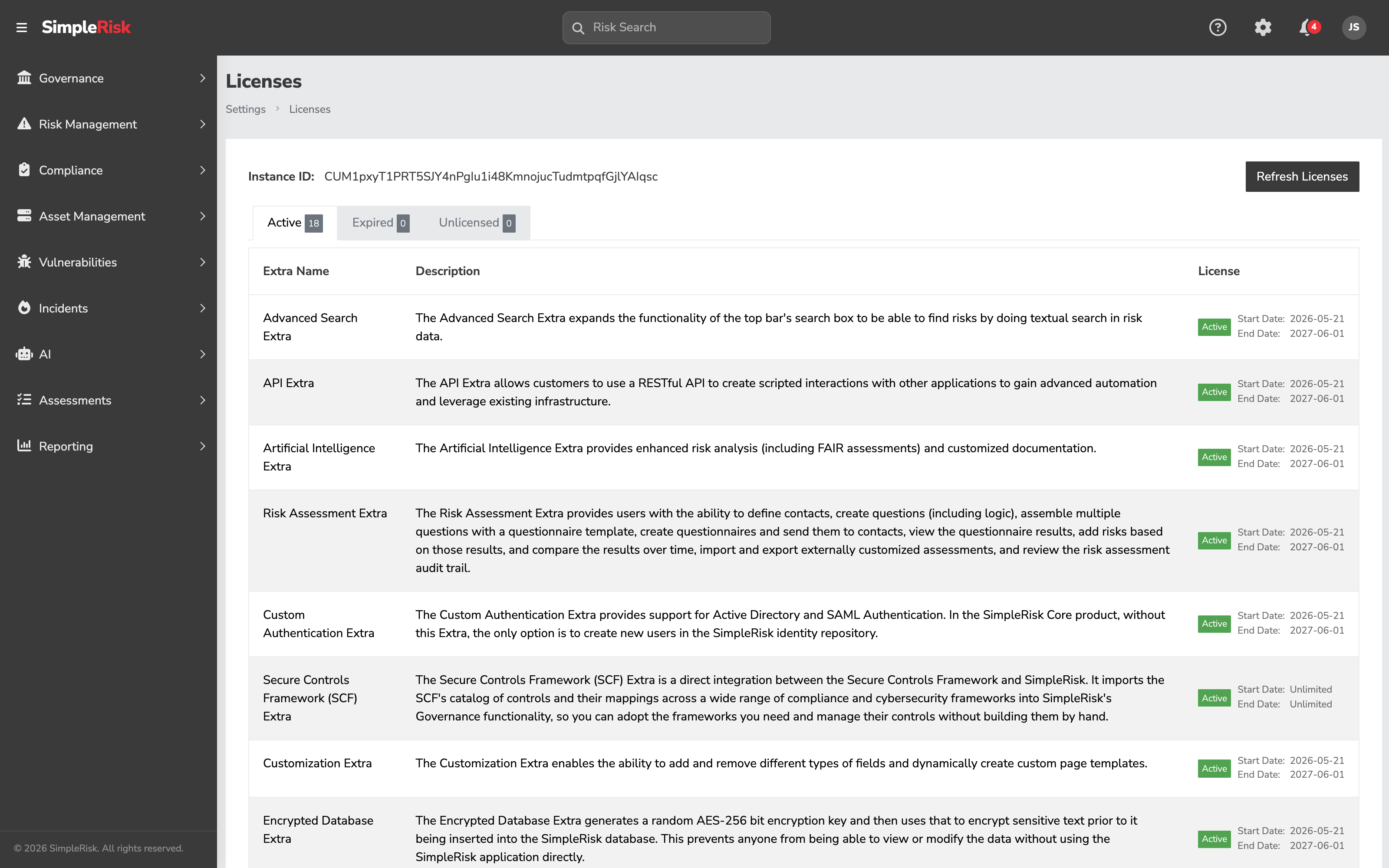
Settings cog → Settings Hub → **Licenses** opens `/admin/licenses.php`. This is the authoritative answer to "what is this instance entitled to?"
At the top sits the **Instance ID** — the identifier SimpleRisk licenses against. Quote it in any support conversation about entitlements. Beside it is the **Refresh Licenses** button, covered below.
Below that, three tabs carry counts:
- **Active** — Extras licensed and in force. Each row gives the Extra's name, its description, an **Active** badge, and the licence's **Start Date** and **End Date**. Some entitlements, the SCF Extra among them, read **Unlimited** on both dates.
- **Expired** — Extras whose licence has lapsed. These stop working; renew to bring them back.
- **Unlicensed** — Extras this instance has no entitlement for. This is the normal state for anything you have not bought.
### 3. Refresh the licences when an Extra shows Disabled
The Licenses page does not query SimpleRisk on every page load — it reads a locally cached copy of your entitlements. That cache refreshes on its own schedule, which means it can lag reality in both directions: after you buy an Extra, and after a period where the instance could not reach the licensing service.
A stale cache shows up two ways:
- The Extras list shows an Extra you own as **Disabled**, with no way to activate it.
- A page carrying licence state shows a banner along the lines of *"SimpleRisk could not reach the licensing service. License state will refresh automatically on the next check."*
**Refresh Licenses** on the Licenses page forces the check immediately. An instance that showed every Extra as Unlicensed will typically come back with the full set Active in a few seconds. Do this before you open a support ticket — it resolves the majority of "I bought this and it will not turn on" cases.
If the counts do not change after a refresh, the problem is upstream of SimpleRisk: either the instance genuinely cannot reach `licensing.simplerisk.com`, or the entitlement is not on your subscription. The two are easy to tell apart — a connectivity failure surfaces the banner above, while a missing entitlement refreshes cleanly and simply leaves the Extra in **Unlicensed**.
### 4. Activate what you are now entitled to
A licence is permission, not activation. Once the Extra shows **Active** on the Licenses page, activate it as normal — see [Installing Extras](https://support.simplerisk.com/kb/01-06-installing-extras?hsLang=en). An Extra can be licensed and still switched off; that is a perfectly ordinary state and often the one you want.
## Common pitfalls
- **Reading Disabled as "not purchased."** This is the pitfall that costs the most time, because the label is doing two jobs. An Extra shows Disabled when the instance has no *current* entitlement — which covers both "never bought" and "bought, but the cached licence data is stale or was fetched while the licensing service was unreachable." Refresh the licences before concluding anything about what you own.
- **Skipping registration because the install "worked."** The install-time registration call has a short timeout and fails silently. The instance runs perfectly well without it — it is simply missing the free Upgrade and SCF Extras, and nothing on screen points that out. If you cannot remember registering, you probably have not.
- **Blocking `licensing.simplerisk.com` at the firewall.** Understandable instinct on a hardened network, and it breaks registration, the licence refresh, and therefore every paid Extra. If egress must stay restricted, allow that one host.
- **Assuming a licence renewal takes effect immediately.** It takes effect when the cache next refreshes. If you renewed this morning and the Extra still reads Expired, refresh the licences rather than waiting.
- **Treating the Instance ID as a secret.** It is an identifier, not a credential, and support will ask for it. Quoting it in a ticket saves a round trip.
## Related
- [The Initial Configuration Wizard](https://support.simplerisk.com/kb/01-05-the-initial-configuration-wizard?hsLang=en) — where install-time registration happens, and the connectivity check that predicts whether it will succeed
- [Installing Extras](https://support.simplerisk.com/kb/01-06-installing-extras?hsLang=en) — activating an Extra once it is licensed
- [The Upgrade Process](https://support.simplerisk.com/kb/02-01-the-upgrade-process?hsLang=en) — what the Upgrade Extra, granted by registration, gives you
- [The ComplianceForge SCF Extra](https://support.simplerisk.com/kb/06-06-configuring-the-complianceforgescf-extra?hsLang=en) — the other Extra registration unlocks
- [FAQs](https://support.simplerisk.com/kb/faqs?hsLang=en)
- [SimpleRisk Extras](https://support.simplerisk.com/kb/simplerisk-extras?hsLang=en#main-content)
- [Vulnerability Management Extra](https://support.simplerisk.com/kb/simplerisk-extras?hsLang=en#vulnerability-management-extra)
- [Team Separation Extra](https://support.simplerisk.com/kb/simplerisk-extras?hsLang=en#team-separation-extra)
- [Import-Export Extra](https://support.simplerisk.com/kb/simplerisk-extras?hsLang=en#import-export-extra)
- [Administrator Guide](https://support.simplerisk.com/kb/administrator-guide?hsLang=en#main-content)
- [00 About This Guide](https://support.simplerisk.com/kb/administrator-guide?hsLang=en#00-about-this-guide)
- [01 Installation and Deployment](https://support.simplerisk.com/kb/administrator-guide?hsLang=en#01-installation-and-deployment)
- [02 Upgrades and Maintenance](https://support.simplerisk.com/kb/administrator-guide?hsLang=en#02-upgrades-and-maintenance)
- [03 Users and Permissions](https://support.simplerisk.com/kb/administrator-guide?hsLang=en#03-users-and-permissions)
- [04 Authentication](https://support.simplerisk.com/kb/administrator-guide?hsLang=en#04-authentication)
- [05 Customization](https://support.simplerisk.com/kb/administrator-guide?hsLang=en#05-customization)
- [06 Configuring Risk and Compliance](https://support.simplerisk.com/kb/administrator-guide?hsLang=en#06-configuring-risk-and-compliance)
- [07 Integrations](https://support.simplerisk.com/kb/administrator-guide?hsLang=en#07-integrations)
- [08 The API](https://support.simplerisk.com/kb/administrator-guide?hsLang=en#08-the-api)
- [09 Encryption and Data Security](https://support.simplerisk.com/kb/administrator-guide?hsLang=en#09-encryption-and-data-security)
- [10 Workflows and Automation](https://support.simplerisk.com/kb/administrator-guide?hsLang=en#10-workflows-and-automation)
- [11 Reporting and Auditing](https://support.simplerisk.com/kb/administrator-guide?hsLang=en#11-reporting-and-auditing)
- [12 Operations](https://support.simplerisk.com/kb/administrator-guide?hsLang=en#12-operations)
- [13 Reference](https://support.simplerisk.com/kb/administrator-guide?hsLang=en#13-reference)
- [User Guide](https://support.simplerisk.com/kb/user-guide?hsLang=en#main-content)
- [00 Foundations of GRC](https://support.simplerisk.com/kb/user-guide?hsLang=en#00-foundations-of-grc)
- [01 Risk Management](https://support.simplerisk.com/kb/user-guide?hsLang=en#01-risk-management)
- [02 Compliance Management](https://support.simplerisk.com/kb/user-guide?hsLang=en#02-compliance-management)
- [03 Governance](https://support.simplerisk.com/kb/user-guide?hsLang=en#03-governance)
- [04 Asset and Data Inventory](https://support.simplerisk.com/kb/user-guide?hsLang=en#04-asset-and-data-inventory)
- [05 Threat and Vulnerability Management](https://support.simplerisk.com/kb/user-guide?hsLang=en#05-threat-and-vulnerability-management)
- [06 Assessments](https://support.simplerisk.com/kb/user-guide?hsLang=en#06-assessments)
- [07 Incident Management](https://support.simplerisk.com/kb/user-guide?hsLang=en#07-incident-management)
- [08 Audit and Reporting](https://support.simplerisk.com/kb/user-guide?hsLang=en#08-audit-and-reporting)
- [09 Day-to-Day SimpleRisk](https://support.simplerisk.com/kb/user-guide?hsLang=en#09-day-to-day-simplerisk)
- [10 Continuous Improvement](https://support.simplerisk.com/kb/user-guide?hsLang=en#10-continuous-improvement)
- [SimpleRisk User Guides](https://support.simplerisk.com/kb/simplerisk-user-guides?hsLang=en)
- [Troubleshooting](https://support.simplerisk.com/kb/troubleshooting?hsLang=en)
- [SimpleRisk Hosted](https://support.simplerisk.com/kb/simplerisk-hosted?hsLang=en)
- [How To videos](https://support.simplerisk.com/kb/how-to-videos?hsLang=en)
[](https://www.simplerisk.com)
Copyright © 2026, SimpleRisk, Inc.