
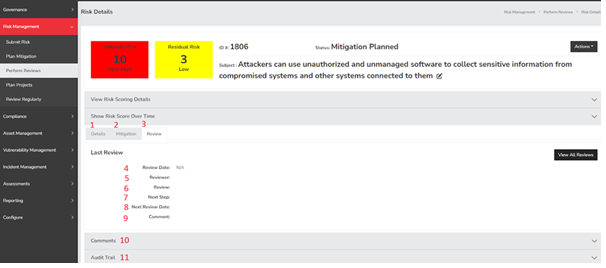
- Details - This button enables the reviewer to view the Risk Details related to the risk under evaluation. Please note that switching tabs will not erase any information previously entered in the review tab.
- Mitigation - This button allows the reviewer to access the Risk Mitigation information associated with the risk being assessed. Similar to the Details tab, switching tabs will not cause any loss of data entered in the review tab.
- Review - This button provides a quick return to the review tab for further evaluation.
- Review Date - This field indicates the date on which the review is recorded as completed by the system.
- Reviewer - This identifies the user who is currently conducting the review.
- Review - This section summarizes the outcome of the review process. The default options are “Approve Risk” and “Reject and Close Risk.” These serve as a quick confirmation of whether the details are accurate and if the risk is worth monitoring, or if it should be dismissed. This field can be customized by navigating to Configure → Add and Remove Values.
- Next Step - This field allows the reviewer to specify the next intended actions or steps. The default options include “Accept Until Next Review,” “Consider for Project” (which will categorize it into the unassigned risk project bucket, provided that all risks aren’t currently visible there), and “Submit as Production Issue” (typically used for critical issues requiring immediate action in production that do not necessitate tracking as a risk).
- Next Review Date - The next review date is determined based on the risk score and the configurations set in “Configure” → “Configure Review Settings.” If you wish to manually adjust the next review date, select “Yes,” and a date selector will appear, allowing you to choose the upcoming review date for this risk.
- Comments - This field is designated for leaving any observations made during the review for future reference.
- Comments - This dropdown provides access to the comments related to the entire risk, typically used for discussions or notes that do not fit into other fields.
- Audit Trail - This audit trail enables you to track all actions and modifications made to this specific risk, along with the corresponding dates and usernames associated with those actions.
Summary
The Risk Review page in SimpleRisk is where you store your reviews of the risks progress throughout the risk life cycle. This page should have served to answer all questions related to planning a review but if you feel anything has been missed or just seek further clarification please reach out to us at support@simplerisk.com.