
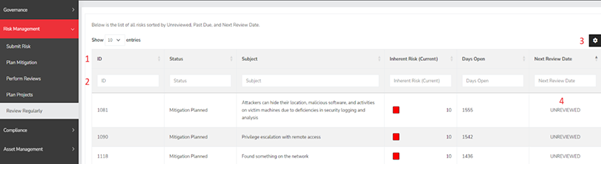
- Column Header - This row shows the names of the displayed fields. You can click on these headers to sort the table according to that specific column.
- Column Filters - These filters enable you to refine the data in the table based on your preferred search criteria. You can apply multiple filters simultaneously.
- Column Configuration - This button allows users to customize which columns are visible in the table below.
- Review Status/Next Review Date - This column indicates the current review status or the last review date for each risk in the system. The statuses are organized as follows: Unreviewed, Past Due, and then the Due Date for reviews that are not yet overdue.
Summary
The Review Regularly page lays out all the risks and their current review status in the order of Unreviewed, Past Due followed by reviews with a date that has yet to pass. The page also allows users to have an easy way to view what risks need management attention next and should become a part of a routine for risk managers. This page should have served to answer all questions related to the Perform Review page but if you feel anything has been missed or just seek further clarification please reach out to us at support@simplerisk.com.