
-
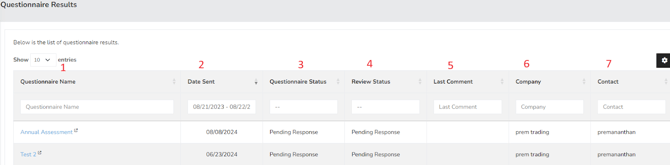
Questionnaire Name – This refers to the specific questionnaire that has been distributed to users for their assessment.
-
Date Sent – This indicates the date on which the assessment was dispatched to the user.
-
Questionnaire Status – This field shows whether there are any questions that remain unanswered. Once all questions are completed and submitted, the status will automatically update to "complete."
-
Review Status – This field reveals whether the results have been reviewed by the questionnaire owner. For questionnaires that include compliance and maturity questions, the results will be linked to their respective controls once approved. Please note that approving a questionnaire does not imply that all pending risks have been accepted.
-
Last Comment – This area displays any comments made regarding the results.
-
Company – The name of the vendor's company.
-
Contact – The individual responsible for overseeing the assessment and risk compliance.
Summary
The Questionnaire Results page displays comprehensive information about the questionnaire. This includes which type of questionnaire was sent for assessment and the status. It also includes the completion percentage, name of the Company and if it’s been finalized or not. This page should have served to answer all questions related to the Questionnaire Results page but if you feel anything has been missed or just seek further clarification, please reach out to us at support@simplerisk.com.