
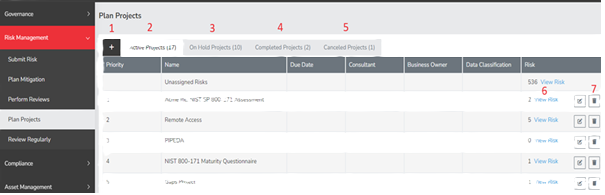
- Add Project - This button enables you to introduce new projects into the system.
- Active Projects - This tab displays the projects currently in progress, highlighting those with active and open risks.
- On Hold Projects - This tab lists projects that are temporarily paused. You can easily drag and drop a project name into this tab to indicate that it is no longer a priority or active.
- Completed Projects - This tab is designated for projects that have been finished. Please note that you may not always need to close the associated risks, as some may still be active and require ongoing review.
- Canceled Projects - This tab is reserved for projects that have been canceled and are no longer needed. Moving a project into this tab will automatically close all associated risks.
- View Risk - Clicking this button will display the risks associated with a specific project.
- Delete - This button allows you to permanently remove a project from the system, but please be aware that this action does not impact the risks linked to that project.
Summary
The Plan Projects page allows users to group their risk in any way they see fit and manage them. This can aid in scheduling mitigations and reviews as well as giving a tool for keeping up with a large group of risks. This page should have served to answer all questions related to the Plan Projects page but if you feel anything has been missed or seek further clarification please reach out to us at support@simplerisk.com.