
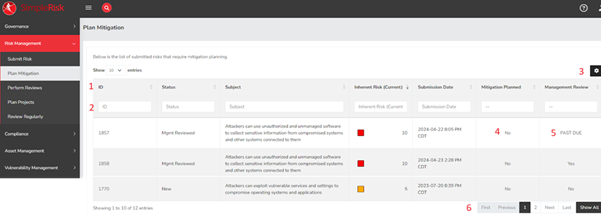
- Column Description - This row provides an overview of the information displayed in each column of the table. You can also click on the header to sort the table alphabetically based on that column.
- Column Filters - Utilize these filters to refine the data displayed in the table according to your specific search criteria. You can apply multiple filters simultaneously.
- Column Configuration - This button enables you to choose which columns you want to appear in the table below.
- Mitigation Planned - This column indicates whether any mitigation actions have been taken. If you click “No,” you will be directed to the Plan Mitigation page for the corresponding risk.
- Management Review - Similar to the Mitigation Planned column, this column allows you to initiate a review. Clicking “No” will take you to the review page for the specific risk.
- Table Pages - The arrows here let users navigate forward and backward through the pages for planned mitigations. By clicking the "All" button, you can view all records without a mitigation on a single page.
Summary
The Plan Mitigation page is a great place to get a handle on your mitigations to ensure all current risks have a mitigation plan. This page should have served to answer all questions related to the Plan Mitigation page but if you feel anything has been missed or seek further clarification please reach out to us at support@simplerisk.com.