
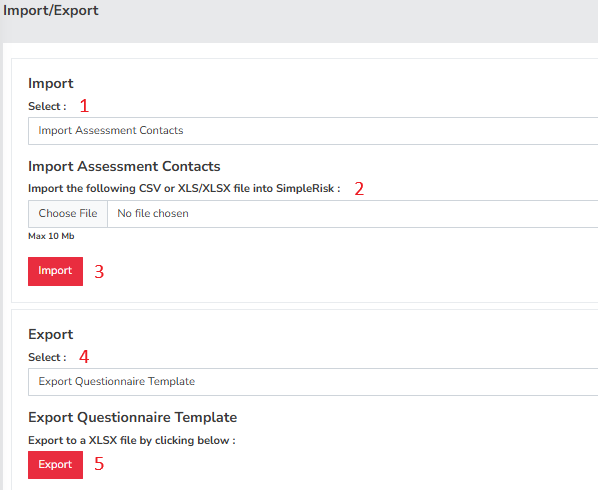
- Import Type - This dropdown menu lets you choose the type of data you wish to import.
- Select File - This opens a dialog box where you can browse and select the file you want to import.
- Import - Press this button to initiate the import mapping process and upload the chosen file.
- Export Type - Use this dropdown to select data for export from either the questionnaire template or the assessment.
- Export - Click this button to download the data based on your selected option.
Summary
By now you should be able to import assessment data and export assessment data and will have seen the fields associated with doing so, if you are looking for more information on the specific fields involved with import please see the related articles for the Risk Assessment Import Guide
This page should have served to answer all questions related to the Import/Export but if you feel anything has been missed or just seek further clarification, please reach out to us at support@simplerisk.com