---
title: How do I add new File Types for File Upload in SimpleRisk?
description: How do i add new file types for file upload in simplerisk
---
[Skip to content](https://support.simplerisk.com/kb/how-do-i-add-new-file-types-for-file-upload-in-simplerisk#main-content)
English
Show submenu for translations
[Customer portal](https://support.simplerisk.com/tickets?hsLang=en)
[](https://www.simplerisk.com/)
Open main navigation
Close main navigation
- English
Show submenu for translations
- [Customer portal](https://support.simplerisk.com/tickets)
- [Contact us](https://www.simplerisk.com/about-us/contact-us)
[Contact us](https://www.simplerisk.com/about-us/contact-us)
How can we help you?
- There are no suggestions because the search field is empty.
1. [SimpleRisk Knowledge Base](https://support.simplerisk.com/kb?hsLang=en)
2. [FAQs](https://support.simplerisk.com/kb/faqs?hsLang=en)
# How do I add new File Types for File Upload in SimpleRisk?
## At times, the standard file types available in SimpleRisk may not meet your needs, prompting the necessity to import a different file format. This brief FAQ will guide you through the precise steps required to add the file type you prefer.
For this guide, we will illustrate using a plain text file, which is already supported by default in our system. To move forward, you will need access to the "Configure" menu. If you do not have administrative privileges for your SimpleRisk instance, please reach out to an admin for assistance.
### Linux
1\) Use “cd” and change to the directory that contains your file.
2\) Use the command “file -b –mime-type example.txt” replacing example.docx with your file of the type you would like to add to SimpleRisk.
You should now have a response that resembles the example below. Please keep this information handy for the next step when we integrate it into SimpleRisk. In the example, where it mentions “text/plain,” you will need to replace that with the MIME type corresponding to your new file type.
[](https://s3.amazonaws.com/cdn.freshdesk.com/data/helpdesk/attachments/production/6142728109/original/E-iBnPXNS7i0RNV42fcC0oayW8Pm8RNBRQ.png?1641838158)
### Adding File Type in SimpleRisk
1\) As an administrator logged into SimpleRisk, start by selecting the “Configure” menu on the left side of your screen.
2\) You should now be in the “Settings” menu. If you find yourself elsewhere, simply click on “Settings” to navigate to the correct area.
3\) Locate the “File Upload” tab at the top of the menu and click on it to continue.
4\) In the field labeled “Add new file type named,” type in the MIME type or File Content Type that you gathered from the previous step.
5\) Then, in the section titled “with extension,” enter the file extension you wish to associate; for this example, we will use “.txt.”
[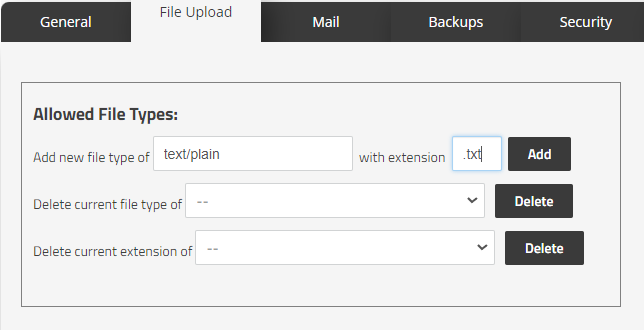](https://s3.amazonaws.com/cdn.freshdesk.com/data/helpdesk/attachments/production/6142728110/original/4jEPb3D83TqyIq9l4yIFUEsE4t-RTuPNYQ.png?1641838158)
6\) Once you have filled in both fields for adding a file type, as demonstrated in the screenshot above, please click the “Add” button at the end of the line to finalize your entry.
### Summary
You have now followed the steps to adding a new file type in SimpleRisk. If you have any questions or found some information to be unclear or lacking please contact us at [support@simplerisk.com](mailto:support@simplerisk.com).
- [FAQs](https://support.simplerisk.com/kb/faqs?hsLang=en)
- [SimpleRisk Extras](https://support.simplerisk.com/kb/simplerisk-extras?hsLang=en#main-content)
- [Vulnerability Management Extra](https://support.simplerisk.com/kb/simplerisk-extras?hsLang=en#vulnerability-management-extra)
- [Team Separation Extra](https://support.simplerisk.com/kb/simplerisk-extras?hsLang=en#team-separation-extra)
- [Import-Export Extra](https://support.simplerisk.com/kb/simplerisk-extras?hsLang=en#import-export-extra)
- [Administrator Guide](https://support.simplerisk.com/kb/administrator-guide?hsLang=en#main-content)
- [00 About This Guide](https://support.simplerisk.com/kb/administrator-guide?hsLang=en#00-about-this-guide)
- [01 Installation and Deployment](https://support.simplerisk.com/kb/administrator-guide?hsLang=en#01-installation-and-deployment)
- [02 Upgrades and Maintenance](https://support.simplerisk.com/kb/administrator-guide?hsLang=en#02-upgrades-and-maintenance)
- [03 Users and Permissions](https://support.simplerisk.com/kb/administrator-guide?hsLang=en#03-users-and-permissions)
- [04 Authentication](https://support.simplerisk.com/kb/administrator-guide?hsLang=en#04-authentication)
- [05 Customization](https://support.simplerisk.com/kb/administrator-guide?hsLang=en#05-customization)
- [06 Configuring Risk and Compliance](https://support.simplerisk.com/kb/administrator-guide?hsLang=en#06-configuring-risk-and-compliance)
- [07 Integrations](https://support.simplerisk.com/kb/administrator-guide?hsLang=en#07-integrations)
- [08 The API](https://support.simplerisk.com/kb/administrator-guide?hsLang=en#08-the-api)
- [09 Encryption and Data Security](https://support.simplerisk.com/kb/administrator-guide?hsLang=en#09-encryption-and-data-security)
- [10 Workflows and Automation](https://support.simplerisk.com/kb/administrator-guide?hsLang=en#10-workflows-and-automation)
- [11 Reporting and Auditing](https://support.simplerisk.com/kb/administrator-guide?hsLang=en#11-reporting-and-auditing)
- [12 Operations](https://support.simplerisk.com/kb/administrator-guide?hsLang=en#12-operations)
- [13 Reference](https://support.simplerisk.com/kb/administrator-guide?hsLang=en#13-reference)
- [User Guide](https://support.simplerisk.com/kb/user-guide?hsLang=en#main-content)
- [00 Foundations of GRC](https://support.simplerisk.com/kb/user-guide?hsLang=en#00-foundations-of-grc)
- [01 Risk Management](https://support.simplerisk.com/kb/user-guide?hsLang=en#01-risk-management)
- [02 Compliance Management](https://support.simplerisk.com/kb/user-guide?hsLang=en#02-compliance-management)
- [03 Governance](https://support.simplerisk.com/kb/user-guide?hsLang=en#03-governance)
- [04 Asset and Data Inventory](https://support.simplerisk.com/kb/user-guide?hsLang=en#04-asset-and-data-inventory)
- [05 Threat and Vulnerability Management](https://support.simplerisk.com/kb/user-guide?hsLang=en#05-threat-and-vulnerability-management)
- [06 Assessments](https://support.simplerisk.com/kb/user-guide?hsLang=en#06-assessments)
- [07 Incident Management](https://support.simplerisk.com/kb/user-guide?hsLang=en#07-incident-management)
- [08 Audit and Reporting](https://support.simplerisk.com/kb/user-guide?hsLang=en#08-audit-and-reporting)
- [09 Day-to-Day SimpleRisk](https://support.simplerisk.com/kb/user-guide?hsLang=en#09-day-to-day-simplerisk)
- [10 Continuous Improvement](https://support.simplerisk.com/kb/user-guide?hsLang=en#10-continuous-improvement)
- [SimpleRisk User Guides](https://support.simplerisk.com/kb/simplerisk-user-guides?hsLang=en)
- [Troubleshooting](https://support.simplerisk.com/kb/troubleshooting?hsLang=en)
- [SimpleRisk Hosted](https://support.simplerisk.com/kb/simplerisk-hosted?hsLang=en)
- [How To videos](https://support.simplerisk.com/kb/how-to-videos?hsLang=en)
[](https://www.simplerisk.com)
Copyright © 2026, SimpleRisk, Inc.