
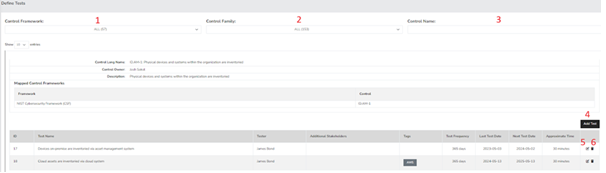
- Control Framework Filter - This feature enables you to narrow down your view to only the controls associated with the selected frameworks from the dropdown menu.
- Control Family Filter - This option allows you to refine your selections to only those Control Families that you choose from the dropdown.
- Control Name - This filter lets you focus on a specific control or a selection of controls by choosing from the dropdown list.
- Add Test - Clicking this button reveals a menu for creating a new test for the specific control linked to the Add Test button you selected.
- Edit Test - This button provides the functionality to modify and update an existing test.
- Delete Test - This option allows you to remove a test permanently. Please note that once a test is deleted, it cannot be recovered, and you will need to recreate it if necessary.
Test Creation
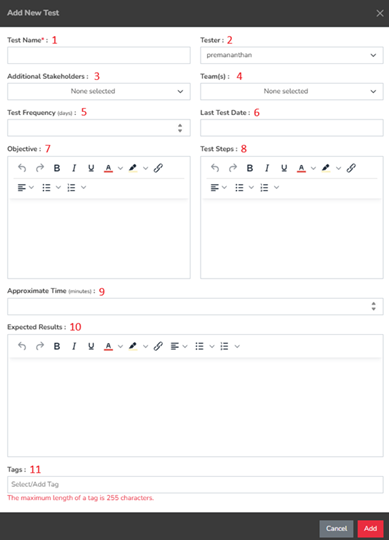
- Test Name - This field identifies the test and serves as the primary reference for users.
- Tester - This is the designated individual responsible for conducting the test. When utilizing Team-Based Separation, ensure that the tester is aligned with your Team-Based Separation setup.
- Additional Stakeholders – This field allows you to select any interested parties who will receive updates on the test's progress.
- Teams – This field permits you to choose the team that will oversee the test.
- Test Frequency – This field indicates how often the test should be conducted.
- Last Test Date – This field records the most recent date the test was performed. It should be earlier than the test creation date.
- Objective – This field allows users to define the purpose of the test.
- Test Steps – This section outlines the necessary steps to carry out the test.
- Approximate Time – This field enables users to indicate the expected duration of the test.
- Expected Results – This section presents the anticipated outcomes of the test.
- Tags – The Tags field is designed for entering relevant keywords associated with the test. You can start typing your desired tag in the Tags area or click the field to browse through the dropdown menu. Tags are reusable and can be easily searched.
Summary
The Define Test page allows users to create tests to record the status of compliance for their control frameworks. This page should have served to answer all questions related to test definition but if you feel anything has been missed or just seek further clarification please reach out to us at support@simplerisk.com.