
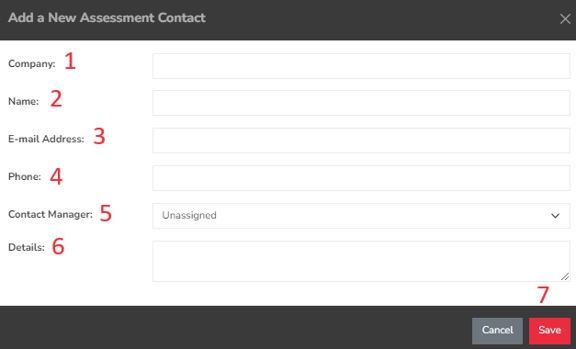
- Company – The name of the vendor’s organization
- Name – The individual responsible for assessment and risk compliance.
- Email Address – The email of the designated contact person at the vendor.
- Phone – The contact number for the person overseeing compliance at the vendor.
- Contact Manager – The owner or account manager from your company.
- Details – Any pertinent information regarding the contact person or the vendor organization.
- Save – Click this button to store the assessment contact information.
Summary
The Assessment Contact page is where all the contacts, internal or external are stored and this enables external vendors to perform assessment even without accessing your Simplerisk system. This page should have served to answer all questions related to the Assessment Contacts page but if you feel anything has been missed or just seek further clarification, please reach out to us at support@simplerisk.com.