
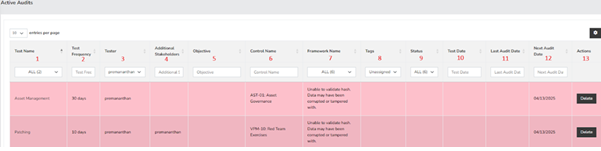
- Test Name- Use this dropdown menu to easily filter tests by their names.
- Test Frequency - This option allows you to narrow down the audits based on how often the tests are conducted.
- Tester - Filter tests by selecting specific individuals assigned to them from this dropdown menu.
- Additional Stakeholders - This field lets you focus on audits assigned to certain stakeholders.
- Objective - Utilize relevant keywords in this field to filter the list of audits.
- Control Name - Use this field to filter audits according to the names of the controls.
- Framework Name - Choose the appropriate framework from this dropdown menu to filter the tests.
- Tags - This dropdown menu allows you to filter tests based on the tags that were assigned during their creation.
- Status - Select the current status of the tests from this dropdown menu, which includes options like unassigned, closed, evidence submitting/pending review, passed internal QA, pending evidence from control owner, and remediation required.
- Test Date - Filter audits based on the dates when the tests were conducted using this field.
- Last Audit Date - This field helps you filter audits according to the date of the last audit that was performed.
- Next Audit Date - Use this field to filter audits by the scheduled date for the next audit.
- Actions - This button will remove the test from the active audit list, but you can still access it within the defined tests.
Summary
This page should have served to answer all questions related to active audits but if you feel anything has been missed or just seek further clarification please reach out to us at support@simplerisk.com.