---
title: 04.04 Tying Risks to Assets
description: Link risks to specific assets or to whole asset groups, understand the bidirectional rollups (risks-by-asset and assets-by-risk reporting), and use the…
---
[Skip to content](https://support.simplerisk.com/kb/04-04-tying-risks-to-assets#main-content)
English
Show submenu for translations
[Customer portal](https://support.simplerisk.com/tickets?hsLang=en)
[](https://www.simplerisk.com/)
Open main navigation
Close main navigation
- English
Show submenu for translations
- [Customer portal](https://support.simplerisk.com/tickets)
- [Contact us](https://www.simplerisk.com/about-us/contact-us)
[Contact us](https://www.simplerisk.com/about-us/contact-us)
How can we help you?
- There are no suggestions because the search field is empty.
1. [SimpleRisk Knowledge Base](https://support.simplerisk.com/kb?hsLang=en)
2. [User Guide](https://support.simplerisk.com/kb/user-guide?hsLang=en)
3. [04 Asset and Data Inventory](https://support.simplerisk.com/kb/user-guide?hsLang=en#04-asset-and-data-inventory)
# 04.04 Tying Risks to Assets
## Link risks to specific assets or to whole asset groups, understand the bidirectional rollups (risks-by-asset and assets-by-risk reporting), and use the linkage to make asset-shaped risks legible to leadership.
## Why this matters
A risk in the abstract is a sentence on a screen. A risk linked to the specific asset it threatens is operational: leadership reads "phishing-delivered ransomware encrypting the finance team's shared file server" and knows which file server, which team, which dependencies will be affected if the risk materializes. The linkage between risks and assets is what turns the risk register from an abstract artifact into a concrete picture of where the program's exposure lives.
The other reason this matters is that the linkage is bidirectional. **Risks-by-asset** reporting answers "what could go wrong with this server" and is the view a system owner reads to understand their exposure. **Assets-by-risk** reporting answers "which systems does this risk affect" and is the view incident responders read when a risk materializes and they need to scope the blast radius quickly. Both views read from the same underlying linkage; without the linkage, neither view works.
The third thing worth knowing: SimpleRisk supports linking risks to **individual assets** *and* to **asset groups**. The two paths produce the same downstream rollup behavior (a risk linked to a group reports as affecting every current member of the group) but the maintenance story differs. Per-asset linkage is precise but requires updating risks when membership changes; group linkage is loose but auto-updates as the group's membership evolves. The right choice depends on how the asset population changes and how often.
The fourth thing: the linkage feeds risk-scoring math. Each linked asset's **Asset Valuation** contributes to the risk's impact calculation. A risk linked only to low-valuation assets has a lower computed impact than the same risk linked to high-valuation assets, automatically and without the risk submitter doing the calculation. The linkage isn't decorative; it's part of the scoring substrate.
## Before you start
Have these in hand before linking risks to assets:
- **The Asset Management permission** on your account (the underlying permission key is `asset`). Without it, the **Affected Assets** widget on the risk form is read-only and you can't add new linkages. (See [Permission Reference](https://support.simplerisk.com/kb/03-03-permission-reference?hsLang=en).)
- **The risk-submission or risk-modification permission** appropriate to what you're doing — **Able to Submit New Risks** for new submissions, **Able to Modify Risk Details** for editing existing risks.
- **A current asset inventory.** The Affected Assets widget can search the inventory and create new assets inline (see [Managing Assets in SimpleRisk](https://support.simplerisk.com/kb/04-02-managing-assets-in-simplerisk?hsLang=en)), but the cleanest workflow is to have the assets you want to link already in the inventory before you start linking. Inline creation puts the new assets into the unverified queue, which an admin then has to verify or discard.
- **A clear sense of the right linkage granularity.** A risk affecting one specific server should link to that server. A risk affecting "all production database servers" should link to an asset group named for that population, not to twenty individual servers (the maintenance story is much better). Pick the granularity that matches the risk's actual scope.
## Step-by-step
### 1. Open or create the risk
Linkage happens on the risk form, not on the asset side. Open the risk you want to link from (Sidebar: **Risk Management → All Open Risks**, then click the risk to open `/management/view.php?id={id}`) or open a new submission (Sidebar: **Risk Management → Submit Risk**, opening `/management/index.php`).
### 2. Find the Affected Assets field
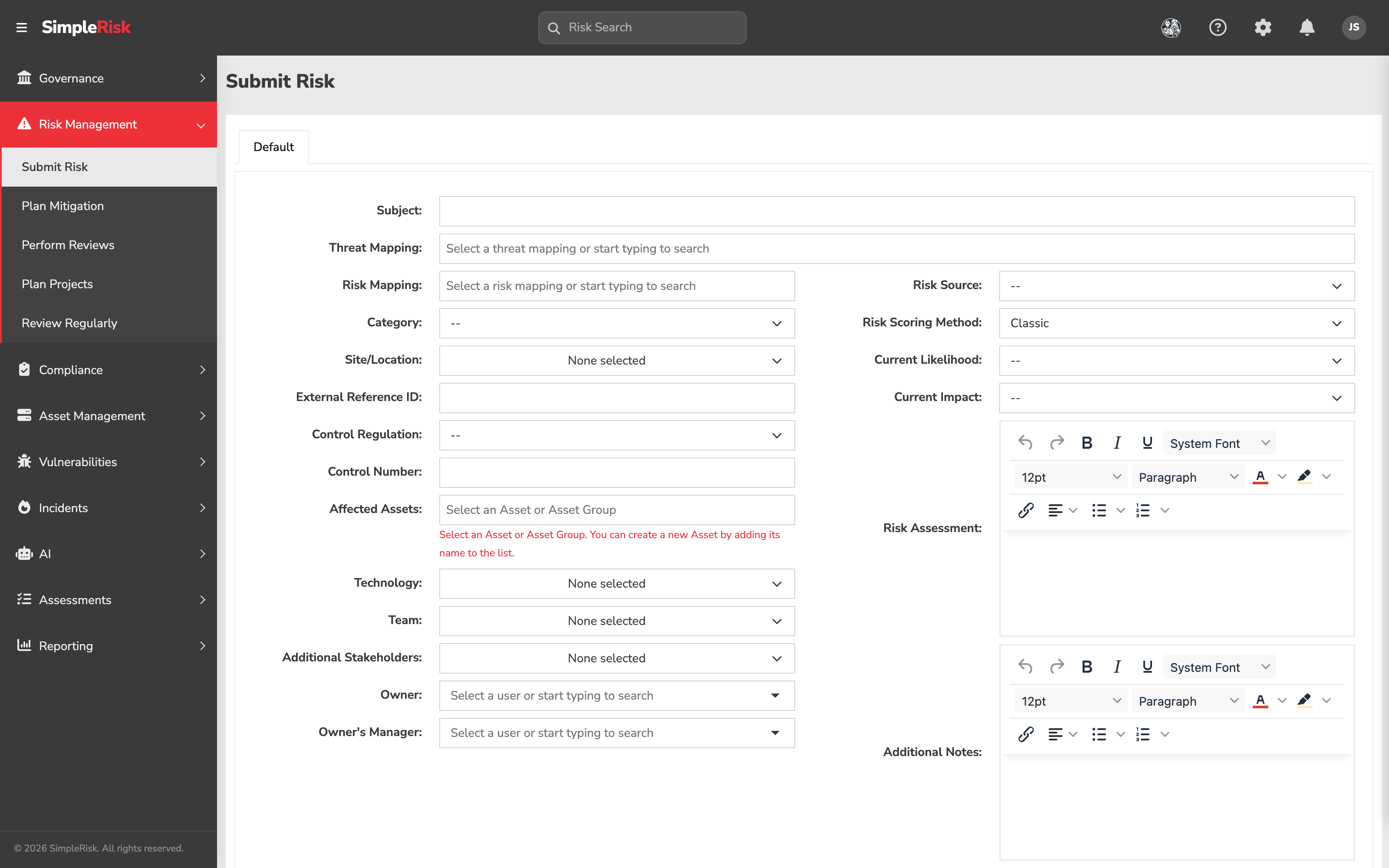
On the **Submit Risk** form, **Affected Assets** is in the left column of the form (see [Submitting a Risk](https://support.simplerisk.com/kb/01-02-submitting-a-risk?hsLang=en)). On an existing risk's detail view, the **Details** tab carries the same field, behind **Edit Details**. The field is a multi-select widget with these characteristics:
- **Search-as-you-type.** Start typing an asset name and matching assets from the inventory appear in the dropdown.
- **Asset *and* asset-group selection.** The dropdown returns both individual assets and asset groups. The widget placeholder is "Select an Asset or Asset Group."
- **Inline create for new assets.** Type a name that doesn't match any existing asset and the widget offers to create it as a new asset. The new asset lands in the **Unverified Assets** queue (see [Managing Assets in SimpleRisk](https://support.simplerisk.com/kb/04-02-managing-assets-in-simplerisk?hsLang=en)) for an admin to verify later.
### 3. Pick the right granularity
Three patterns cover most cases:
- **One specific asset.** If the risk genuinely affects only one named system ("the customer data warehouse on the east-coast cluster"), link to that one asset.
- **A small set of named assets.** If the risk affects three or four specific systems and the population won't change ("the three legacy file servers being decommissioned in Q3"), link to each of them individually.
- **An asset group.** If the risk affects a population that has its own logical name ("all PCI-scope systems," "all production-tier database servers," "all customer-facing API endpoints"), link to the asset group instead of to its current members. When the group's membership changes, the risk's effective scope updates automatically.
You can mix the three on a single risk — link to one specific asset *and* to an asset group, or to two specific assets *and* to two groups, etc. Reporting de-duplicates at read time.
### 4. Save the risk
Click **Submit Risk** (for a new submission) or save the change (for an existing risk's edit). SimpleRisk writes the linkage rows and recomputes the risk's score using the linked assets' valuations. The risk's detail view shows the linked assets (and groups) under **Affected Assets**.
For programmatic linkage (useful when integrating with an external tool that submits risks tied to specific assets, or when bulk-updating asset-linkage on existing risks) the v2 API supports the linkage as part of the standard risk endpoints:
- `POST /api/v2/risks/submit` accepts an `assets_asset_groups` parameter (an array of asset IDs and/or asset group IDs).
- `PATCH /api/v2/risks/{id}` updates the linkage on an existing risk; pass the full new array, since the patch replaces rather than appends.
- `GET /api/v2/risks/{id}` includes an `affected_assets` array in the response, with the asset and asset-group references resolved to names.
### 5. Read the risks-by-asset view
Open any asset in the **Asset Management** module to see the **Associated Risks** section, which lists every risk linked to that asset. The view answers "what could go wrong with this asset?" and is the view a system owner reads when reviewing their exposure.
For asset groups, the **Manage Asset Groups** view shows the risks linked to each group. The risks here are *only* the ones linked to the group itself, not the union of risks linked to the individual member assets — those are visible on each individual asset's view.
### 6. Read the assets-by-risk view
Open any risk's detail view to see the **Affected Assets** section, which lists every asset (and asset group) linked to that risk. The view answers "which systems does this risk affect?" and is the view incident responders read when scoping the blast radius of a materialized risk.
For risks linked to asset groups, the asset-side view expands the group at read time so each member asset shows the risk on its **Associated Risks** list. The expansion is dynamic: if you add a new asset to a group later, risks already linked to the group automatically appear on the new asset's list.
### 7. Use the linkage on dashboards and reports
The Risk Management Dashboard widgets read from the asset linkage to produce the **Asset Exposure** rollups (when those widgets are added to the dashboard layout — see [The Risk Dashboard](https://support.simplerisk.com/kb/01-07-the-risk-dashboard?hsLang=en)). The standard report library exposes asset-shaped views including:
- **Risks and Assets** (`/reports/risks_and_assets.php`) — the matrix of risks by asset.
- **All Open Risks By Team By Level** — implicitly draws on asset-team assignments for the team grouping.
- **High Risk Report** — surfaces risks where the asset-derived impact contribution is high.
For programs whose risk reporting needs to roll up by asset population (PCI scope, customer-facing tier, regulated environment), build asset groups for those populations and use the group-linked risks plus the group-membership rollups to produce the cuts leadership wants.
## Common pitfalls
A handful of patterns recur when teams use the linkage.
- **Risks linked to no assets at all.** A risk with no asset linkage produces a register entry that doesn't surface in any asset-side view. The auditor reading the asset's profile won't see the risk; the system owner reviewing exposure won't see it either. For asset-shaped risks (which is most risks), always link. The exceptions — risks that genuinely don't have an asset substrate, like reputational risks or some compliance risks — should be the small minority.
- **Linking to twenty individual assets when one group would do.** A risk linked to twenty individual asset rows requires twenty linkage updates the next time the population changes. The same risk linked to one asset group requires zero updates as long as the group's membership stays current. Reach for the group abstraction whenever the assets you're linking to are a recognizable population.
- **Inline asset creation as the default workflow.** The Affected Assets widget can create new assets inline, which is convenient and creates a queue of unverified assets the admin team has to clean up. When the inventory is well-maintained, inline creation should be rare; when it's the default path, it's a sign that the inventory isn't keeping pace with the systems being deployed. Fix the upstream inventory pipeline; reserve inline creation for genuine one-off cases.
- **Linking to a group whose membership doesn't reflect the risk's scope.** Linking a risk to "Production Database Cluster" when the risk actually affects "Production *and* DR Database Cluster" is a maintenance trap — the risk under-represents its scope, and discovering the mismatch usually happens during incident response when there's no time to fix it. Either link to multiple groups, or expand the group to match the actual risk scope (and review whether the group definition was correct in the first place).
- **Forgetting that asset deletion orphans linkages.** Deleting an asset doesn't unlink the risks that referenced it; it leaves those links pointing at an asset that no longer exists. The risk's view shows the dangling reference as an unresolved entry, and the affected-asset count drops without the program noticing why. Before deleting an asset, audit its **Associated Risks** and decide whether to retire-with-rename (preserving the linkage history) or delete-and-accept (orphaning the linkages). See [Managing Assets in SimpleRisk](https://support.simplerisk.com/kb/04-02-managing-assets-in-simplerisk?hsLang=en).
- **Treating the linkage as a one-time act.** Asset linkage on a risk is supposed to be revisited as the risk evolves. A risk submitted last year linked to a server that's since been decommissioned and re-platformed needs the linkage updated to reflect the current systems; otherwise the risk-by-asset view shows the risk against a system that no longer exists. The per-risk review cycle (see [Tracking Risks Over Time](https://support.simplerisk.com/kb/01-06-tracking-risks-over-time?hsLang=en)) is when linkage updates should happen as a matter of course.
- **Ignoring the asset-derived impact contribution.** A risk linked to high-valuation assets should have higher impact than a risk linked to low-valuation assets. When the program's risk-scoring math doesn't show that differentiation, two things are usually going on: either the asset valuations aren't calibrated (see [Data Classification and Asset Criticality](https://support.simplerisk.com/kb/04-03-data-classification-and-asset-criticality?hsLang=en)) or the risks aren't actually linked to the right assets. Either way, the math is missing inputs it needs.
- **Linking risks to the asset *group* and to the asset *members* simultaneously.** A risk linked both to "Production Database Cluster" and to each individual server in that cluster produces double-counting in some downstream queries. The right pattern is one or the other: link to the group when the risk affects the population; link to specific members when the risk affects a specific subset that doesn't have its own group. If a different subset comes up often, make a new group for it.
## Related
- [Why an Asset Inventory is the Foundation of GRC](https://support.simplerisk.com/kb/04-01-why-an-asset-inventory-is-the-foundation-of-grc?hsLang=en)
- [Managing Assets in SimpleRisk](https://support.simplerisk.com/kb/04-02-managing-assets-in-simplerisk?hsLang=en)
- [Data Classification and Asset Criticality](https://support.simplerisk.com/kb/04-03-data-classification-and-asset-criticality?hsLang=en)
- [Submitting a Risk in SimpleRisk](https://support.simplerisk.com/kb/01-02-submitting-a-risk?hsLang=en)
- [Tracking Risks Over Time](https://support.simplerisk.com/kb/01-06-tracking-risks-over-time?hsLang=en)
- [The Risk Dashboard](https://support.simplerisk.com/kb/01-07-the-risk-dashboard?hsLang=en)
- [Permission Reference](https://support.simplerisk.com/kb/03-03-permission-reference?hsLang=en)
- [FAQs](https://support.simplerisk.com/kb/faqs?hsLang=en)
- [SimpleRisk Extras](https://support.simplerisk.com/kb/simplerisk-extras?hsLang=en#main-content)
- [Vulnerability Management Extra](https://support.simplerisk.com/kb/simplerisk-extras?hsLang=en#vulnerability-management-extra)
- [Team Separation Extra](https://support.simplerisk.com/kb/simplerisk-extras?hsLang=en#team-separation-extra)
- [Import-Export Extra](https://support.simplerisk.com/kb/simplerisk-extras?hsLang=en#import-export-extra)
- [Administrator Guide](https://support.simplerisk.com/kb/administrator-guide?hsLang=en#main-content)
- [00 About This Guide](https://support.simplerisk.com/kb/administrator-guide?hsLang=en#00-about-this-guide)
- [01 Installation and Deployment](https://support.simplerisk.com/kb/administrator-guide?hsLang=en#01-installation-and-deployment)
- [02 Upgrades and Maintenance](https://support.simplerisk.com/kb/administrator-guide?hsLang=en#02-upgrades-and-maintenance)
- [03 Users and Permissions](https://support.simplerisk.com/kb/administrator-guide?hsLang=en#03-users-and-permissions)
- [04 Authentication](https://support.simplerisk.com/kb/administrator-guide?hsLang=en#04-authentication)
- [05 Customization](https://support.simplerisk.com/kb/administrator-guide?hsLang=en#05-customization)
- [06 Configuring Risk and Compliance](https://support.simplerisk.com/kb/administrator-guide?hsLang=en#06-configuring-risk-and-compliance)
- [07 Integrations](https://support.simplerisk.com/kb/administrator-guide?hsLang=en#07-integrations)
- [08 The API](https://support.simplerisk.com/kb/administrator-guide?hsLang=en#08-the-api)
- [09 Encryption and Data Security](https://support.simplerisk.com/kb/administrator-guide?hsLang=en#09-encryption-and-data-security)
- [10 Workflows and Automation](https://support.simplerisk.com/kb/administrator-guide?hsLang=en#10-workflows-and-automation)
- [11 Reporting and Auditing](https://support.simplerisk.com/kb/administrator-guide?hsLang=en#11-reporting-and-auditing)
- [12 Operations](https://support.simplerisk.com/kb/administrator-guide?hsLang=en#12-operations)
- [13 Reference](https://support.simplerisk.com/kb/administrator-guide?hsLang=en#13-reference)
- [User Guide](https://support.simplerisk.com/kb/user-guide?hsLang=en#main-content)
- [00 Foundations of GRC](https://support.simplerisk.com/kb/user-guide?hsLang=en#00-foundations-of-grc)
- [01 Risk Management](https://support.simplerisk.com/kb/user-guide?hsLang=en#01-risk-management)
- [02 Compliance Management](https://support.simplerisk.com/kb/user-guide?hsLang=en#02-compliance-management)
- [03 Governance](https://support.simplerisk.com/kb/user-guide?hsLang=en#03-governance)
- [04 Asset and Data Inventory](https://support.simplerisk.com/kb/user-guide?hsLang=en#04-asset-and-data-inventory)
- [05 Threat and Vulnerability Management](https://support.simplerisk.com/kb/user-guide?hsLang=en#05-threat-and-vulnerability-management)
- [06 Assessments](https://support.simplerisk.com/kb/user-guide?hsLang=en#06-assessments)
- [07 Incident Management](https://support.simplerisk.com/kb/user-guide?hsLang=en#07-incident-management)
- [08 Audit and Reporting](https://support.simplerisk.com/kb/user-guide?hsLang=en#08-audit-and-reporting)
- [09 Day-to-Day SimpleRisk](https://support.simplerisk.com/kb/user-guide?hsLang=en#09-day-to-day-simplerisk)
- [10 Continuous Improvement](https://support.simplerisk.com/kb/user-guide?hsLang=en#10-continuous-improvement)
- [SimpleRisk User Guides](https://support.simplerisk.com/kb/simplerisk-user-guides?hsLang=en)
- [Troubleshooting](https://support.simplerisk.com/kb/troubleshooting?hsLang=en)
- [SimpleRisk Hosted](https://support.simplerisk.com/kb/simplerisk-hosted?hsLang=en)
- [How To videos](https://support.simplerisk.com/kb/how-to-videos?hsLang=en)
[](https://www.simplerisk.com)
Copyright © 2026, SimpleRisk, Inc.